文章列表


magento2主题经典案例

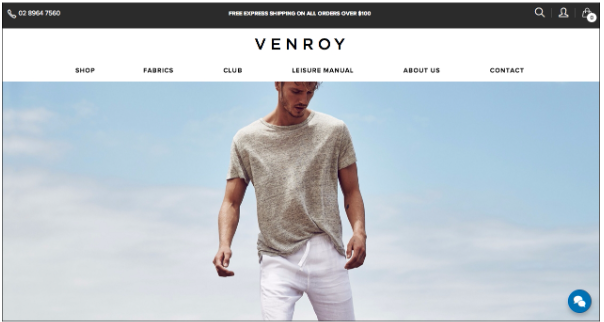
<h5 style="color:red;">系统学习magento二次开发,推荐小册:<a style="color:blue;" href="https://www.maxiaoke.com/manual/magento_cn_dev.html" target="_blank">《Magento中文全栈二次开发 》</a></h5> <div class="image-container"> <p> <a style="color:blue;" href="https://www.maxiaoke.com/manual/magento_cn_dev.html" target="_blank"> <img src="https://www.maxiaoke.com/uploads/images/20230218/bb9c82995c24d1105676e02f373755f5.jpg" alt="Magento中文全栈二次开发"> </a> </p> </div> <div class="text-container" style="font-size:14px; color:#888"> <p>本小册面向Magento2以上版本,书代码及示例兼容magento2.0-2.4版本。涵盖了magento前端开发,后端开发,magento2主题,magento2重写,magento2 layout,magento2控制器,magento2 block等相关内容,带领您成为magento开发技术专家。</p> </div> <hr><p style="box-sizing: border-box; margin-top: 0px; margin-bottom: 16px; color: rgb(77, 82, 89); font-family: &quot;Microsoft YaHei&quot;, Helvetica, &quot;Meiryo UI&quot;, &quot;Malgun Gothic&quot;, &quot;Segoe UI&quot;, &quot;Trebuchet MS&quot;, Monaco, monospace, Tahoma, STXihei, 华文细黑, STHeiti, &quot;Helvetica Neue&quot;, &quot;Droid Sans&quot;, &quot;wenquanyi micro hei&quot;, FreeSans, Arimo, Arial, SimSun, 宋体, Heiti, 黑体, sans-serif; text-wrap: wrap;">有很多电子商务网站使用Magento,其中一些网站真正展示了Magento在主题化方面的灵活性。以下是精选的现场Magento商店,它们真正推动了平台超越了你已经看到的典型Magento主题</p><h3 style="box-sizing: border-box; margin-top: 1.75em; margin-bottom: 16px; font-weight: 300; line-height: 1.43; font-size: 1.5em; font-family: Raleway, 微軟正黑體, &quot;Helvetica Neue&quot;, Helvetica, Arial, sans-serif; letter-spacing: 0.5px; position: relative; color: rgb(77, 82, 89); text-wrap: wrap;"><a class="reference-link" style="box-sizing: border-box; color: rgb(51, 202, 187); background-image: initial; background-position: initial; background-size: initial; background-repeat: initial; background-attachment: initial; background-origin: initial; background-clip: initial; transition: all 0.3s linear 0s; outline: none !important;"></a>Venroy</h3><p style="box-sizing: border-box; margin-top: 0px; margin-bottom: 16px; color: rgb(77, 82, 89); font-family: &quot;Microsoft YaHei&quot;, Helvetica, &quot;Meiryo UI&quot;, &quot;Malgun Gothic&quot;, &quot;Segoe UI&quot;, &quot;Trebuchet MS&quot;, Monaco, monospace, Tahoma, STXihei, 华文细黑, STHeiti, &quot;Helvetica Neue&quot;, &quot;Droid Sans&quot;, &quot;wenquanyi micro hei&quot;, FreeSans, Arimo, Arial, SimSun, 宋体, Heiti, 黑体, sans-serif; text-wrap: wrap;">Venroy是澳大利亚的一家男装百货公司。他们的Magento 2商店(<a href="https://www.venroy.com.au/" style="box-sizing: border-box; color: rgb(51, 202, 187); text-decoration-line: none; background-image: initial; background-position: initial; background-size: initial; background-repeat: initial; background-attachment: initial; background-origin: initial; background-clip: initial; transition: all 0.3s linear 0s; outline: none !important;">https://www.venroy.com.au</a>) 遵循基本的Magento 2设计原则和RWD设计:</p><p style="box-sizing: border-box; margin-top: 0px; margin-bottom: 16px; color: rgb(77, 82, 89); font-family: &quot;Microsoft YaHei&quot;, Helvetica, &quot;Meiryo UI&quot;, &quot;Malgun Gothic&quot;, &quot;Segoe UI&quot;, &quot;Trebuchet MS&quot;, Monaco, monospace, Tahoma, STXihei, 华文细黑, STHeiti, &quot;Helvetica Neue&quot;, &quot;Droid Sans&quot;, &quot;wenquanyi micro hei&quot;, FreeSans, Arimo, Arial, SimSun, 宋体, Heiti, 黑体, sans-serif; text-wrap: wrap;"><img src="https://www.maxiaoke.com/uploads/images/20230716/dafe7a1614c78f4302e8bcaf1a19445c.png" alt=""/></p><p style="box-sizing: border-box; margin-top: 0px; margin-bottom: 16px; color: rgb(77, 82, 89); font-family: &quot;Microsoft YaHei&quot;, Helvetica, &quot;Meiryo UI&quot;, &quot;Malgun Gothic&quot;, &quot;Segoe UI&quot;, &quot;Trebuchet MS&quot;, Monaco, monospace, Tahoma, STXihei, 华文细黑, STHeiti, &quot;Helvetica Neue&quot;, &quot;Droid Sans&quot;, &quot;wenquanyi micro hei&quot;, FreeSans, Arimo, Arial, SimSun, 宋体, Heiti, 黑体, sans-serif; text-wrap: wrap;">与Magento 2中提供的Luma默认主题相比,该商店的主页以不同的方式构建。例如,Venroy网站的主要导航显示在屏幕的顶部中心,使其对客户高度可见。</p><p style="box-sizing: border-box; margin-top: 0px; margin-bottom: 16px; color: rgb(77, 82, 89); font-family: &quot;Microsoft YaHei&quot;, Helvetica, &quot;Meiryo UI&quot;, &quot;Malgun Gothic&quot;, &quot;Segoe UI&quot;, &quot;Trebuchet MS&quot;, Monaco, monospace, Tahoma, STXihei, 华文细黑, STHeiti, &quot;Helvetica Neue&quot;, &quot;Droid Sans&quot;, &quot;wenquanyi micro hei&quot;, FreeSans, Arimo, Arial, SimSun, 宋体, Heiti, 黑体, sans-serif; text-wrap: wrap;">当与之交互时,商店的类别视图会扩展以显示更具体的子类别:</p><p style="box-sizing: border-box; margin-top: 0px; margin-bottom: 16px; color: rgb(77, 82, 89); font-family: &quot;Microsoft YaHei&quot;, Helvetica, &quot;Meiryo UI&quot;, &quot;Malgun Gothic&quot;, &quot;Segoe UI&quot;, &quot;Trebuchet MS&quot;, Monaco, monospace, Tahoma, STXihei, 华文细黑, STHeiti, &quot;Helvetica Neue&quot;, &quot;Droid Sans&quot;, &quot;wenquanyi micro hei&quot;, FreeSans, Arimo, Arial, SimSun, 宋体, Heiti, 黑体, sans-serif; text-wrap: wrap;"><img src="https://www.maxiaoke.com/uploads/images/20230716/c7a5c697a25c59ee1b3d0295e63aca58.png" alt=""/></p><p style="box-sizing: border-box; margin-top: 0px; margin-bottom: 16px; color: rgb(77, 82, 89); font-family: &quot;Microsoft YaHei&quot;, Helvetica, &quot;Meiryo UI&quot;, &quot;Malgun Gothic&quot;, &quot;Segoe UI&quot;, &quot;Trebuchet MS&quot;, Monaco, monospace, Tahoma, STXihei, 华文细黑, STHeiti, &quot;Helvetica Neue&quot;, &quot;Droid Sans&quot;, &quot;wenquanyi micro hei&quot;, FreeSans, Arimo, Arial, SimSun, 宋体, Heiti, 黑体, sans-serif; text-wrap: wrap;">产品详细视图也是高度定制的,产品、交付和尺寸指南的信息都有自己的单独块:</p><p style="box-sizing: border-box; margin-top: 0px; margin-bottom: 16px; color: rgb(77, 82, 89); font-family: &quot;Microsoft YaHei&quot;, Helvetica, &quot;Meiryo UI&quot;, &quot;Malgun Gothic&quot;, &quot;Segoe UI&quot;, &quot;Trebuchet MS&quot;, Monaco, monospace, Tahoma, STXihei, 华文细黑, STHeiti, &quot;Helvetica Neue&quot;, &quot;Droid Sans&quot;, &quot;wenquanyi micro hei&quot;, FreeSans, Arimo, Arial, SimSun, 宋体, Heiti, 黑体, sans-serif; text-wrap: wrap;"><img src="https://www.maxiaoke.com/uploads/images/20230716/7e1625616cfd9361baa2bae6a37131b8.png" alt=""/></p><h3 style="box-sizing: border-box; margin-top: 1.75em; margin-bottom: 16px; font-weight: 300; line-height: 1.43; font-size: 1.5em; font-family: Raleway, 微軟正黑體, &quot;Helvetica Neue&quot;, Helvetica, Arial, sans-serif; letter-spacing: 0.5px; position: relative; color: rgb(77, 82, 89); text-wrap: wrap;"><a class="reference-link" style="box-sizing: border-box; color: rgb(51, 202, 187); background-image: initial; background-position: initial; background-size: initial; background-repeat: initial; background-attachment: initial; background-origin: initial; background-clip: initial; transition: all 0.3s linear 0s; outline: none !important;"></a>Alcatel Onetouch</h3><p style="box-sizing: border-box; margin-top: 0px; margin-bottom: 16px; color: rgb(77, 82, 89); font-family: &quot;Microsoft YaHei&quot;, Helvetica, &quot;Meiryo UI&quot;, &quot;Malgun Gothic&quot;, &quot;Segoe UI&quot;, &quot;Trebuchet MS&quot;, Monaco, monospace, Tahoma, STXihei, 华文细黑, STHeiti, &quot;Helvetica Neue&quot;, &quot;Droid Sans&quot;, &quot;wenquanyi micro hei&quot;, FreeSans, Arimo, Arial, SimSun, 宋体, Heiti, 黑体, sans-serif; text-wrap: wrap;">阿尔卡特 Onetouch(<a href="http://www.alcatelonetouch.us/" style="box-sizing: border-box; color: rgb(51, 202, 187); text-decoration-line: none; background-image: initial; background-position: initial; background-size: initial; background-repeat: initial; background-attachment: initial; background-origin: initial; background-clip: initial; transition: all 0.3s linear 0s; outline: none !important;">http://www.alcatelonetouch.us/</a>) 是一个国际移动技术品牌,采用Magento 2来销售其产品:<br/><img src="https://www.maxiaoke.com/uploads/images/20230716/1adebae9c0f6c9f1ef91f4daca36a1d4.png" alt=""/></p><p style="box-sizing: border-box; margin-top: 0px; margin-bottom: 16px; color: rgb(77, 82, 89); font-family: &quot;Microsoft YaHei&quot;, Helvetica, &quot;Meiryo UI&quot;, &quot;Malgun Gothic&quot;, &quot;Segoe UI&quot;, &quot;Trebuchet MS&quot;, Monaco, monospace, Tahoma, STXihei, 华文细黑, STHeiti, &quot;Helvetica Neue&quot;, &quot;Droid Sans&quot;, &quot;wenquanyi micro hei&quot;, FreeSans, Arimo, Arial, SimSun, 宋体, Heiti, 黑体, sans-serif; text-wrap: wrap;">正如你所看到的,主页是高度定制的,主页上显示的是特色产品。</p><p style="box-sizing: border-box; margin-top: 0px; margin-bottom: 16px; color: rgb(77, 82, 89); font-family: &quot;Microsoft YaHei&quot;, Helvetica, &quot;Meiryo UI&quot;, &quot;Malgun Gothic&quot;, &quot;Segoe UI&quot;, &quot;Trebuchet MS&quot;, Monaco, monospace, Tahoma, STXihei, 华文细黑, STHeiti, &quot;Helvetica Neue&quot;, &quot;Droid Sans&quot;, &quot;wenquanyi micro hei&quot;, FreeSans, Arimo, Arial, SimSun, 宋体, Heiti, 黑体, sans-serif; text-wrap: wrap;">作为Magento商店的一部分,产品详细信息页面的风格也很吸引人,有足够的屏幕空间显示产品评论、详细信息、技术规范和手册等信息:</p><p style="box-sizing: border-box; margin-top: 0px; margin-bottom: 16px; color: rgb(77, 82, 89); font-family: &quot;Microsoft YaHei&quot;, Helvetica, &quot;Meiryo UI&quot;, &quot;Malgun Gothic&quot;, &quot;Segoe UI&quot;, &quot;Trebuchet MS&quot;, Monaco, monospace, Tahoma, STXihei, 华文细黑, STHeiti, &quot;Helvetica Neue&quot;, &quot;Droid Sans&quot;, &quot;wenquanyi micro hei&quot;, FreeSans, Arimo, Arial, SimSun, 宋体, Heiti, 黑体, sans-serif; text-wrap: wrap;"><img src="https://www.maxiaoke.com/uploads/images/20230716/bf0337240b57b46bc958d86a839c5de8.png" alt=""/></p><p><br/></p>

Kafka延迟操作-DelayedJoin

<p>DelayedJoin是协助组协调器在消费组准备平衡操作时进行相应的处理。当消费组的状态转换为PreparingRebalance时,即准备进行平衡操作,在组协调器的prepareRebalance()方法中会创建一个DelayedJoin对象,并交由DelayedOperationPurgatory负责监视管理。在消费组进行平衡操作时之所以需要DelayedJoin处理,是为了让组协调器等待当前消费组下所有的消费者都请求加入消费组,即发起了JoinGroupRequest请求。每次组协调器处理完JoinGroupRequest时都会检测DelayedJoin是否满足了完成执行的条件。</p><p>在消费组进行平衡操作时之所以需要DelayedJoin处理,是为了让组协调器等待当前消费组下所有的消费者都请求加入消费组,即发起了JoinGroupRequest请求。每次组协调器处理完JoinGroupRequest时都会检测DelayedJoin是否满足了完成执行的条件。</p><p>DelayedJoin相应方法的实现是调用GroupCoordinator相关方法来完成。DelayedJoin.tryComplete()调用的是GroupCoordinator.tryCompleteJoin()方法,该方法判断是否还有未申请加入消费组的消费者,若所有消费者均已申请加入消费组,则表示DelayedJoin满足了完成执行的条件,否则继续等待,直到满足执行条件或超时。而DelayedJoin.onComplete()方法调用的是GroupCoordinator.onCompleteJoin()方法,onCompleteJoin()方法的主要执行逻辑如下。</p><p>2)若消费组的状态不为Dead(消费组的状态会在3.3节进行相应介绍),则先初始化与协调器对应的一个轮值标识generationId,然后根据该消费组下的成员列表是否为空分别做相应处理。若该消费组没有任何成员,则需要构造消息的Value为空的消费组相关元数据消息,即该消费组对应的元数据信息为空,这里是利用Kafka消息压缩清除的原理,当某消息的Value为空时则表示将要删除同Key的消息,组协调器通过这种方式将消费组相应数据从Kafka内部主题(“__consumer_offsets”)中清除。否则,遍历消费组下的每个成员构造JoinGroupResult,不过Leader消费者比Follower消费者多一个当前消费组的元数据信息字段。最后通过回调函数将JoinGroupResult发送给消费者,并对当前和下一次的心跳检测做相应处理。</p><p>(3)将第2步消费组元数据消息写入Kafka内部主题,即在第2步若消费组下已没有任何成员时,只是构造了一条与消费组元数据信息相关的消息,该消息的Value为空,这样当经由本步操作之后,会将该消费组在Kafka内部主题保存的消息删除。DelayedJoin的功能及相应方法已介绍完毕,DelayedJoin.onExpiration()的方法也是调用GroupCoordinator.onExpireJoin()方法,不过该方法没有做任何实现。</p><p><br/></p>

kafka延迟操作

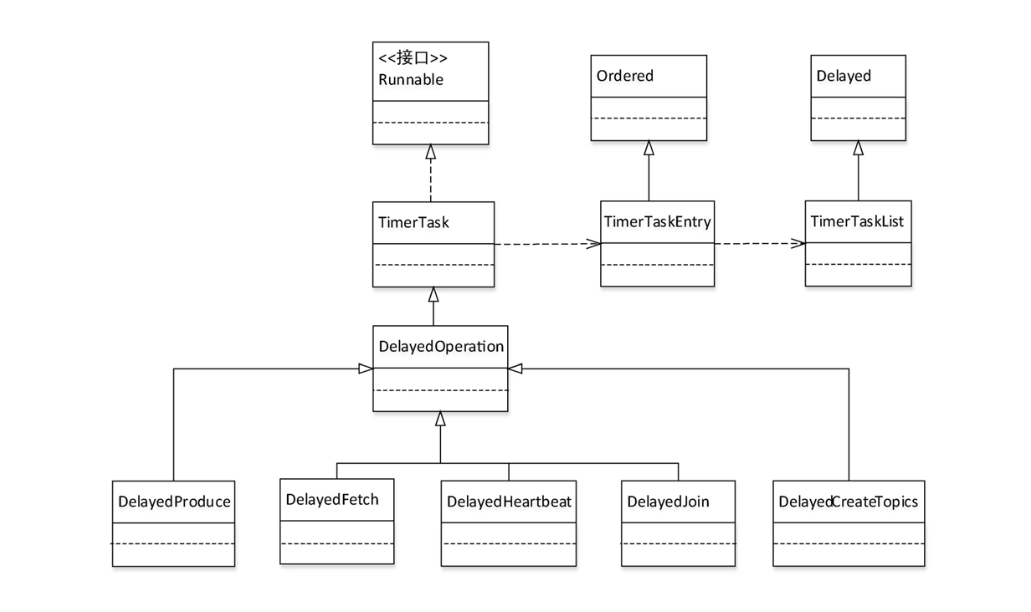
<p>关联小册:</p><p><img src="/uploads/images/20230710/abfeea8b3fa115a76a11593ab8f2072a.jpg" title="1.jpg" alt=""/></p><p><br/></p><p>链接:</p><p><a href="https://www.maxiaoke.com/manual/kafka_base.html" target="_blank" title="kafka入门到实战">https://www.maxiaoke.com/manual/kafka_base.html</a></p><p><br/></p><p>本节先简要介绍Kafka延迟操作的组件,该组件可以辅助Kafka其他组件完成相应的功能,如协助客户端处理创建主题操作、协助组协调器(GroupCoordinator)处理JoinGroupRequest和HeartbeatRequest请求、协助副本管理器(ReplicaManager)处理ProduceRequest和FetchRequest请求。因此在讲解Kafka其他组件之前,先介绍Kafka的延迟操作组。</p><p><br/></p><p><br/>&nbsp;DelayedOperationKafka将一些不立即执行而要等待满足一定条件之后才触发完成的操作称为延迟操作,并将这类操作定义为一个抽象类DelayedOperation, DelayedOperation是一个基于事件启动有失效时间的TimerTask。TimerTask实现了Runnable接口,维护了一个TimerTaskEntry对象,TimerTaskEntry绑定了一个TimerTask,TimerTaskEntry被添加到TimerTaskList中,TimerTaskList是一个环形双向链表,按失效时间排序。DelayedOperation是一个抽象类,具体的延迟操作类继承于该抽象类,分别用来协助相应组件对不同的请求完成延迟处理操作,类图如图3-1所示。</p><p><br/></p><p><img src="/uploads/images/20230713/29541f0e893bd107c69e632fc156409c.png" title="1.png" alt="" width="886" height="458"/></p><p><br/></p><p>DelayedOperation只有一个AtomicBoolean类型的completed属性,用来控制某个延迟操作。在延迟时间(delayMs)内,onComplete()方法只被调用一次。DelayedOperation主要方法如下。● tryComplete()方法:一个抽象方法,由子类来实现,负责检测执行条件是否满足。若满足执行条件,则调用forceComplete()方法完成延迟操作。● forceCompete()方法:该方法在条件满足时,检测延迟任务是否未被执行。若未被执行,则先调用TimerTask.cancel()方法解除该延迟操作与TimerTaskEntry的绑定,将该延迟操作从TimerTaskList链表中移除,然后调用onComplete()方法让延迟操作执行完成。</p><p><br/></p><p>通过completed的CAS原子操作(completed.compareAndSet),可以保证并发操作时只有第一个调用该方法的线程能够顺利调用onComplete()完成延迟操作,其他线程获取的completed属性为false,即不会调用onComplete()方法,这就保证了onComplete()只会被调用一次。</p><p><br/></p><p>● onComplete()方法:是一个抽象方法,由子类来实现,执行延迟操作满足执行条件后需要执行的实际业务逻辑。例如,DelayedProduce和DelayedFetch都是在该方法内调用responseCallback向客户端做出响应。</p><p><br/></p><p>● safeTryComplete()方法:以synchronized同步锁调用onComplete()方法,供外部调用。</p><p><br/></p><p>● onExpiration()方法:也是一个抽象方法,由子类来实现当延迟操作已达失效时间的相应逻辑处理。Kafka通过SystemTimer来定期检测请求是否超时。SystemTimer是Kafka实现的底层基于层级时间轮和DelayQueue定时器,维护了一个newFixedThreadPool线程池,用于提交相应的线程执行。</p><p><br/></p><p>例如,当检测到延迟操作已失效时则将延迟操作提交到该线程池,即执行线程的run()方法的逻辑。DelayedOperation覆盖了TimerTask的run()方法,在该方法中先调用forceCompete()方法,当该方法返回true后再调用onExpiration()方法。</p><p><br/></p><p>Kafka当前的设计onComplete()方法是向客户端做出响应的唯一出口,当延迟操作达到失效时间时也是先执行forceCompete()方法,让onComplete()方法执行之后再调用onExpiration()方法,在onExpiration()方法中仅是进行相应的过期信息收集之类的操作。</p><p><br/></p><p>DelayedOperationPurgatory是一个对DelayedOperation管理的辅助类,为了书写简便,我们将其简称为Purgatory。Purgatory以泛型的形式将一个DelayedOperation添加到其内部维护的Pool[Any, Watchers]类型watchersForKey对象中,同时将DelayedOperation添加到SystemTimer中。</p><p><br/></p><p>其中,Watchers是Purgatory的内部类,底层是一个ConcurrentLinkedQueue,该类定义了一个ConcurrentLinkedQueue类型的operations属性,用于保存DelayedOperation。从Watchers类名可以看出,该类的作用就是对DelayedOperation进行监视。Watchers提供了以下3个对DelayedOperation操作的方法。</p><p><br/></p><p>● watch()方法:用于将DelayedOperation添加到operations集合中。</p><p><br/></p><p>● tryCompleteWatched()方法:用于迭代operations集合中的DelayedOperation,通过DelayedOperation.isCompleted检测该DelayedOperation是否已执行完成。若已执行完成,则从operations集合中移除该DelayedOperation。否则调用DelayedOperation.safeTryComplete()方法尝试让该DelayedOperation执行完成,若执行完成,即safeTryComplete()方法返回true,则将该DelayedOperation从operations集合中移除。最后检测operations集合是否为空,如果operations为空,则表示该operations所关联的DelayedOperation已全部执行完成,因此将该Watchers从Purgatory的Pool中移除。</p><p><br/></p><p>● purgeCompleted()方法:与tryCompleteWatched()方法基本功能类似,区别在于purgeCompleted()方法只单纯地将该operations集合中已完成的DelayedOperation移除,对未完成的DelayedOperation并不尝试将其执行完成。</p><p><br/></p><p>我们可以简单地将Purgatory与Spring Quartz类比,这样对Purgatory的作用就不难理解了。Purgatory相当于Quartz的SchedulerFactoryBean,而DelayedOperation相当于ScheduleFactoryBean所管理的具体Schedule,由Purgatory负责调度。只不过Purgatory除了管理调度DelayedOperation之外,还负责DelayedOperation超时的管理。下面简要介绍Purgatory的两个主要方法。</p><p><br/></p><p>● tryCompleteElseWatch()方法:该方法首先调用待检测的DelayedOperation.safeTryComplete()方法,检测是否能执行完成,若未执行完成,则迭代watchersForKey对应的DelayedOperation检测DelayedOperation是否已完成,若未完成,则将其添加到Watchers中。添加完成后,再调用safeTryComplete()方法再次尝试让DelayedOpeartion执行完成,若还是未完成,再将其添加到SystemTimer中。添加完后再次检测是否执行完成,若已执行完成则将其从SystemTimer中移除可以看到,在整个操作逻辑中多次执行safeTryComplete()方法以及多次检测是否已完成,是以防在操作过程中可能已被其他线程触发执行完成。同时在将DelayedOperation添加到Watchers操作时并没有将原来的Key清理掉,这是因为Purgatory在启动时会同时启动一个ExpiredOperationReaper线程,该线程除了推进时间轮的指针外还会定期清理watchersForKey已完成的DelayedOperation。</p><p><br/></p><p>checkAndComplete()方法:根据所传入的Key,检测该Key对应的Watchers是否执行完成,若未完成,再调用Watchers.tryCompleteWatched()方法进行处理。</p><p><br/></p><p>由此可见,Purgatory对DelayedOperation的管理是通过Watchers来完成的,通过Watchers调用DelayedOperation相应的方法,让DelayedOperation要么在delayMs时间内完成,要么超时。在对Purgatory有了基本了解之后,下面将逐一介绍DelayedOperation实现类的具体作用及实现细节。</p><p><br/></p>

详细盘点六个Magento2中的产品及其类型

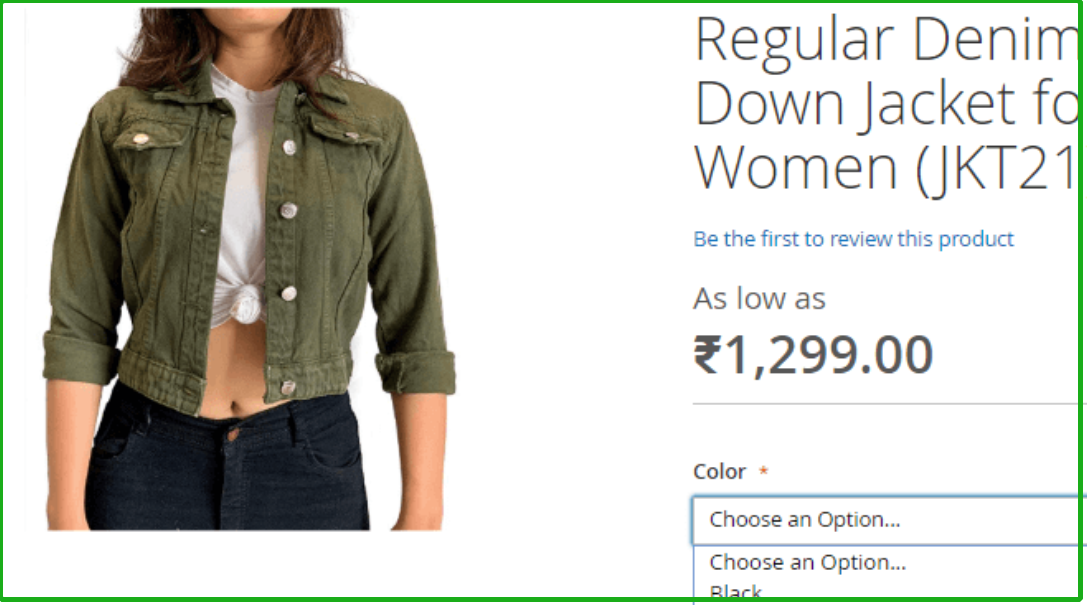
<h5 style="color:red;">系统学习magento二次开发,推荐小册:<a style="color:blue;" href="https://www.maxiaoke.com/manual/magento_cn_dev.html" target="_blank">《Magento中文全栈二次开发 》</a></h5> <div class="image-container"> <p> <a style="color:blue;" href="https://www.maxiaoke.com/manual/magento_cn_dev.html" target="_blank"> <img src="https://www.maxiaoke.com/uploads/images/20230218/bb9c82995c24d1105676e02f373755f5.jpg" alt="Magento中文全栈二次开发"> </a> </p> </div> <div class="text-container" style="font-size:14px; color:#888"> <p>本小册面向Magento2以上版本,书代码及示例兼容magento2.0-2.4版本。涵盖了magento前端开发,后端开发,magento2主题,magento2重写,magento2 layout,magento2控制器,magento2 block等相关内容,带领您成为magento开发技术专家。</p> </div> <hr><p style="text-wrap: wrap;"><span style="text-wrap: nowrap;">学习Magento开发:</span></p><p style="text-wrap: wrap;"><span style="text-wrap: nowrap;"><img src="https://www.maxiaoke.com/uploads/images/20230218/bb9c82995c24d1105676e02f373755f5.jpg" title="Man.jpg" alt=""/></span></p><p style="text-wrap: wrap;"><span style="text-wrap: nowrap;">点击查看:--&gt;&nbsp;&nbsp;<a href="https://www.maxiaoke.com/manual/magento_cn_dev.html" target="_blank" style="color: rgb(79, 129, 189);"><strong>magento中文全栈二次开发</strong></a></span></p><p style="color: rgb(51, 51, 51); font-family: inter-regular, system-ui, -apple-system, BlinkMacSystemFont, &quot;Segoe UI&quot;, Roboto, &quot;Helvetica Neue&quot;, Helvetica, Arial, sans-serif; text-align: justify; text-wrap: wrap; background-color: rgb(255, 255, 255);">Magento 2不仅可以帮助我们管理商店,还可以灵活地处理多种产品。Magento 2甚至可以灵活地定制一个可以满足我们所有业务需求的定制产品。我们可以通过多种变体在Magento 2中创建可配置的产品。在创建产品之前,我们需要创建产品的类别。</p><p style="color: rgb(51, 51, 51); font-family: inter-regular, system-ui, -apple-system, BlinkMacSystemFont, &quot;Segoe UI&quot;, Roboto, &quot;Helvetica Neue&quot;, Helvetica, Arial, sans-serif; text-align: justify; text-wrap: wrap; background-color: rgb(255, 255, 255);">Magento 2默认支持<span style="font-family: inter-bold, system-ui, -apple-system, BlinkMacSystemFont, &quot;Segoe UI&quot;, Roboto, &quot;Helvetica Neue&quot;, Helvetica, Arial, sans-serif; font-weight: 700;">六种类型的</span>产品。这些是:</p><ol class="points list-paddingleft-2" style="color: rgb(51, 51, 51); font-family: inter-regular, system-ui, -apple-system, BlinkMacSystemFont, &quot;Segoe UI&quot;, Roboto, &quot;Helvetica Neue&quot;, Helvetica, Arial, sans-serif; text-align: justify; text-wrap: wrap; background-color: rgb(255, 255, 255);"><li><p>简单的产品</p></li><li><p>可配置产品</p></li><li><p>分组产品</p></li><li><p>虚拟产品</p></li><li><p>捆绑产品</p></li><li><p>可下载产品</p></li></ol><p style="color: rgb(51, 51, 51); font-family: inter-regular, system-ui, -apple-system, BlinkMacSystemFont, &quot;Segoe UI&quot;, Roboto, &quot;Helvetica Neue&quot;, Helvetica, Arial, sans-serif; text-align: justify; text-wrap: wrap; background-color: rgb(255, 255, 255);">要在Magento 2商店中添加新产品,请参阅下一章。这些产品的简要说明如下:</p><h2 class="h2" style="line-height: 1.3em; font-family: erdana, helvetica, arial, sans-serif; color: rgb(97, 11, 56); font-weight: 400; font-size: 25px; text-align: justify; text-wrap: wrap; background-color: rgb(255, 255, 255);">1. 简单的产品</h2><p style="color: rgb(51, 51, 51); font-family: inter-regular, system-ui, -apple-system, BlinkMacSystemFont, &quot;Segoe UI&quot;, Roboto, &quot;Helvetica Neue&quot;, Helvetica, Arial, sans-serif; text-align: justify; text-wrap: wrap; background-color: rgb(255, 255, 255);">简单产品是没有任何可选变化的物理项目。它是最受欢迎的产品之一,也是商店的单位。在Magento 2中,简单产品由其名称定义,这意味着这种类型的产品单独销售,或作为可配置,捆绑或分组产品的一部分出售。简单的产品具有真实的定价,但没有颜色和尺寸可供选择或其他选择。每个产品都有其<span style="font-family: inter-bold, system-ui, -apple-system, BlinkMacSystemFont, &quot;Segoe UI&quot;, Roboto, &quot;Helvetica Neue&quot;, Helvetica, Arial, sans-serif; font-weight: 700;">SKU</span>(<em>商店保管单位</em>)代码。</p><p style="color: rgb(51, 51, 51); font-family: inter-regular, system-ui, -apple-system, BlinkMacSystemFont, &quot;Segoe UI&quot;, Roboto, &quot;Helvetica Neue&quot;, Helvetica, Arial, sans-serif; text-align: justify; text-wrap: wrap; background-color: rgb(255, 255, 255);"><span style="font-family: inter-bold, system-ui, -apple-system, BlinkMacSystemFont, &quot;Segoe UI&quot;, Roboto, &quot;Helvetica Neue&quot;, Helvetica, Arial, sans-serif; font-weight: 700;">例如-</span>包、移动电源、杯子或桌子等</p><p style="color: rgb(51, 51, 51); font-family: inter-regular, system-ui, -apple-system, BlinkMacSystemFont, &quot;Segoe UI&quot;, Roboto, &quot;Helvetica Neue&quot;, Helvetica, Arial, sans-serif; text-align: justify; text-wrap: wrap; background-color: rgb(255, 255, 255);"><img src="/uploads/images/20230626/a7620ea0e1037c88d98f6b5e68b98432.png" title="image.png" alt="" width="727" height="376"/></p><h2 class="h2" style="line-height: 1.3em; font-family: erdana, helvetica, arial, sans-serif; color: rgb(97, 11, 56); font-weight: 400; font-size: 25px; text-align: justify; text-wrap: wrap; background-color: rgb(255, 255, 255);">2. 可配置产品</h2><p style="color: rgb(51, 51, 51); font-family: inter-regular, system-ui, -apple-system, BlinkMacSystemFont, &quot;Segoe UI&quot;, Roboto, &quot;Helvetica Neue&quot;, Helvetica, Arial, sans-serif; text-align: justify; text-wrap: wrap; background-color: rgb(255, 255, 255);">可配置产品比简单产品有点复杂。可配置产品是简单产品与其他选项(如尺寸、颜色、材料等)的组合。每个选项都有一个单独的 SKU,允许商店管理员跟踪每个产品变体的库存。</p><p style="color: rgb(51, 51, 51); font-family: inter-regular, system-ui, -apple-system, BlinkMacSystemFont, &quot;Segoe UI&quot;, Roboto, &quot;Helvetica Neue&quot;, Helvetica, Arial, sans-serif; text-align: justify; text-wrap: wrap; background-color: rgb(255, 255, 255);"><span style="font-family: inter-bold, system-ui, -apple-system, BlinkMacSystemFont, &quot;Segoe UI&quot;, Roboto, &quot;Helvetica Neue&quot;, Helvetica, Arial, sans-serif; font-weight: 700;">例如-</span>牛仔全袖夹克是一种可配置的产品,因为它有不同的颜色和尺寸可供选择。</p><p style="color: rgb(51, 51, 51); font-family: inter-regular, system-ui, -apple-system, BlinkMacSystemFont, &quot;Segoe UI&quot;, Roboto, &quot;Helvetica Neue&quot;, Helvetica, Arial, sans-serif; text-align: justify; text-wrap: wrap; background-color: rgb(255, 255, 255);"><img src="/uploads/images/20230626/02d23790d87010f12958e2622cc92013.png" title="image.png" alt="" width="761" height="417"/></p><h2 class="h2" style="line-height: 1.3em; font-family: erdana, helvetica, arial, sans-serif; color: rgb(97, 11, 56); font-weight: 400; font-size: 25px; text-align: justify; text-wrap: wrap; background-color: rgb(255, 255, 255);">3. 分组产品</h2><p style="color: rgb(51, 51, 51); font-family: inter-regular, system-ui, -apple-system, BlinkMacSystemFont, &quot;Segoe UI&quot;, Roboto, &quot;Helvetica Neue&quot;, Helvetica, Arial, sans-serif; text-align: justify; text-wrap: wrap; background-color: rgb(255, 255, 255);">分组产品是几个简单产品或虚拟产品的集合,它们以组的形式呈现。它们具有相同的特征或彼此相关,并且都显示在单个页面上。分组产品没有价格,只有他们的子产品有价格。这些产品可以单独购买,也可以成组购买,<span style="font-family: inter-bold, system-ui, -apple-system, BlinkMacSystemFont, &quot;Segoe UI&quot;, Roboto, &quot;Helvetica Neue&quot;, Helvetica, Arial, sans-serif; font-weight: 700;">例如</span>不同尺寸的刀具套装。</p><p style="color: rgb(51, 51, 51); font-family: inter-regular, system-ui, -apple-system, BlinkMacSystemFont, &quot;Segoe UI&quot;, Roboto, &quot;Helvetica Neue&quot;, Helvetica, Arial, sans-serif; text-align: justify; text-wrap: wrap; background-color: rgb(255, 255, 255);">当您想在那个时候推广任何产品时,分组产品效果很好。因此,我们可以组合这些项目,这是对彼此的补充。在这种情况下,我们激励客户一次购买多种产品。</p><p style="color: rgb(51, 51, 51); font-family: inter-regular, system-ui, -apple-system, BlinkMacSystemFont, &quot;Segoe UI&quot;, Roboto, &quot;Helvetica Neue&quot;, Helvetica, Arial, sans-serif; text-align: justify; text-wrap: wrap; background-color: rgb(255, 255, 255);"><span style="font-family: inter-bold, system-ui, -apple-system, BlinkMacSystemFont, &quot;Segoe UI&quot;, Roboto, &quot;Helvetica Neue&quot;, Helvetica, Arial, sans-serif; font-weight: 700;">例如 -</span>&nbsp;一套家具、夏季服装(带帽子和短裤的太阳镜)和美容产品组合(睫毛膏眼线笔)等。</p><p><img src="/uploads/images/20230626/1b9b4268a06c0d17e71756bee09e07a4.png" title="image.png" alt="" width="753" height="315"/></p><p style="color: rgb(51, 51, 51); font-family: inter-regular, system-ui, -apple-system, BlinkMacSystemFont, &quot;Segoe UI&quot;, Roboto, &quot;Helvetica Neue&quot;, Helvetica, Arial, sans-serif; text-align: justify; text-wrap: wrap; background-color: rgb(255, 255, 255);">在Magento 2中创建分组产品时,我们必须牢记以下几点:</p><ul class="points list-paddingleft-2" style="list-style-type: circle;"><li><p>分组产品的总价应等于组中包含的单个简单产品的总和。</p></li><li><p>尽管产品被添加到单个组中,但产品在购物车中单独呈现。</p></li><li><p>我们可以为产品组设置库存可用性,而库存必须单独管理。</p></li></ul><h2 class="h2" style="line-height: 1.3em; font-family: erdana, helvetica, arial, sans-serif; color: rgb(97, 11, 56); font-weight: 400; font-size: 25px; text-align: justify; text-wrap: wrap; background-color: rgb(255, 255, 255);">4. 虚拟产品</h2><p style="color: rgb(51, 51, 51); font-family: inter-regular, system-ui, -apple-system, BlinkMacSystemFont, &quot;Segoe UI&quot;, Roboto, &quot;Helvetica Neue&quot;, Helvetica, Arial, sans-serif; text-align: justify; text-wrap: wrap; background-color: rgb(255, 255, 255);">虚拟产品是那些没有物理存在的产品。因此,它们不需要运送、下载或交付。它们与简单产品非常相似,但没有重量选项。虚拟产品不是有形的。它们通常用于会员资格、订阅和保修等产品。虚拟产品可以与分组产品和捆绑产品结合使用。</p><p style="color: rgb(51, 51, 51); font-family: inter-regular, system-ui, -apple-system, BlinkMacSystemFont, &quot;Segoe UI&quot;, Roboto, &quot;Helvetica Neue&quot;, Helvetica, Arial, sans-serif; text-align: justify; text-wrap: wrap; background-color: rgb(255, 255, 255);"><span style="font-family: inter-bold, system-ui, -apple-system, BlinkMacSystemFont, &quot;Segoe UI&quot;, Roboto, &quot;Helvetica Neue&quot;, Helvetica, Arial, sans-serif; font-weight: 700;">例如-</span>预订、在线课程或咨询、保险、会员、订阅和技术服务等您可以为客户提供两年保修、安装服务或 VIP 会员资格。</p><p><img src="/uploads/images/20230626/51ec832ff1626a7ec2ec22539600cd41.png" title="image.png" alt="" width="668" height="345"/></p><h2 class="h2" style="line-height: 1.3em; font-family: erdana, helvetica, arial, sans-serif; color: rgb(97, 11, 56); font-weight: 400; font-size: 25px; text-align: justify; text-wrap: wrap; background-color: rgb(255, 255, 255);">5. 捆绑产品</h2><p style="color: rgb(51, 51, 51); font-family: inter-regular, system-ui, -apple-system, BlinkMacSystemFont, &quot;Segoe UI&quot;, Roboto, &quot;Helvetica Neue&quot;, Helvetica, Arial, sans-serif; text-align: justify; text-wrap: wrap; background-color: rgb(255, 255, 255);">捆绑产品是定制产品,其中包括多个<span style="font-family: inter-bold, system-ui, -apple-system, BlinkMacSystemFont, &quot;Segoe UI&quot;, Roboto, &quot;Helvetica Neue&quot;, Helvetica, Arial, sans-serif; font-weight: 700;">简单</span>产品或<span style="font-family: inter-bold, system-ui, -apple-system, BlinkMacSystemFont, &quot;Segoe UI&quot;, Roboto, &quot;Helvetica Neue&quot;, Helvetica, Arial, sans-serif; font-weight: 700;">虚拟产品</span>。捆绑产品是不能单独销售的简单产品的集合。捆绑产品允许客户从各种选项中“构建自己的”。客户可以使用任何可用的选项来塑造此产品。</p><p style="color: rgb(51, 51, 51); font-family: inter-regular, system-ui, -apple-system, BlinkMacSystemFont, &quot;Segoe UI&quot;, Roboto, &quot;Helvetica Neue&quot;, Helvetica, Arial, sans-serif; text-align: justify; text-wrap: wrap; background-color: rgb(255, 255, 255);">捆绑产品在其他电子商务平台中也称为“套件”。</p><p style="color: rgb(51, 51, 51); font-family: inter-regular, system-ui, -apple-system, BlinkMacSystemFont, &quot;Segoe UI&quot;, Roboto, &quot;Helvetica Neue&quot;, Helvetica, Arial, sans-serif; text-align: justify; text-wrap: wrap; background-color: rgb(255, 255, 255);"><span style="font-family: inter-bold, system-ui, -apple-system, BlinkMacSystemFont, &quot;Segoe UI&quot;, Roboto, &quot;Helvetica Neue&quot;, Helvetica, Arial, sans-serif; font-weight: 700;">例如-</span>捆绑包可以是礼品篮、个人电脑、Xbox 捆绑包、雪碧瑜伽伴侣套件,其中包含不同的物品,例如 - 瑜伽积木、球、瑜伽带和泡沫滚轴。在这种情况下,客户必须购买该套件中的所有物品,因为他们别无选择。</p><p><img src="/uploads/images/20230626/1deee51c6c8f4c31703d69c590b5d822.png" title="image.png" alt="" width="662" height="422"/></p><h2 class="h2" style="line-height: 1.3em; font-family: erdana, helvetica, arial, sans-serif; color: rgb(97, 11, 56); font-weight: 400; font-size: 25px; text-align: justify; text-wrap: wrap; background-color: rgb(255, 255, 255);">6. 可下载产品</h2><p style="color: rgb(51, 51, 51); font-family: inter-regular, system-ui, -apple-system, BlinkMacSystemFont, &quot;Segoe UI&quot;, Roboto, &quot;Helvetica Neue&quot;, Helvetica, Arial, sans-serif; text-align: justify; text-wrap: wrap; background-color: rgb(255, 255, 255);">可下载产品是那些可供下载的产品,例如电子书、软件、视频和文件等。客户只有在下载这些产品后才能使用。在下载之前,他们只能观看预告片,样品进行测试。这些文件可以驻留在您的服务器上,也可以作为 URL 提供给任何其他服务器。</p><p style="color: rgb(51, 51, 51); font-family: inter-regular, system-ui, -apple-system, BlinkMacSystemFont, &quot;Segoe UI&quot;, Roboto, &quot;Helvetica Neue&quot;, Helvetica, Arial, sans-serif; text-align: justify; text-wrap: wrap; background-color: rgb(255, 255, 255);">简而言之,可供下载的产品称为可下载产品。它们是可数字下载的产品,可让您销售数字产品。</p><p style="color: rgb(51, 51, 51); font-family: inter-regular, system-ui, -apple-system, BlinkMacSystemFont, &quot;Segoe UI&quot;, Roboto, &quot;Helvetica Neue&quot;, Helvetica, Arial, sans-serif; text-align: justify; text-wrap: wrap; background-color: rgb(255, 255, 255);"><span style="font-family: inter-bold, system-ui, -apple-system, BlinkMacSystemFont, &quot;Segoe UI&quot;, Roboto, &quot;Helvetica Neue&quot;, Helvetica, Arial, sans-serif; font-weight: 700;">例如-</span>面向学习者的瑜伽视频、游戏、Magento 扩展、音乐文件和软件等。是可下载的产品。</p><p><img src="/uploads/images/20230626/b71499461bd68a4ced248cee2e1d34ac.png" title="image.png" alt="" width="666" height="379"/></p><p><br/></p>

详细讲解10个Magento 2 中的基本配置

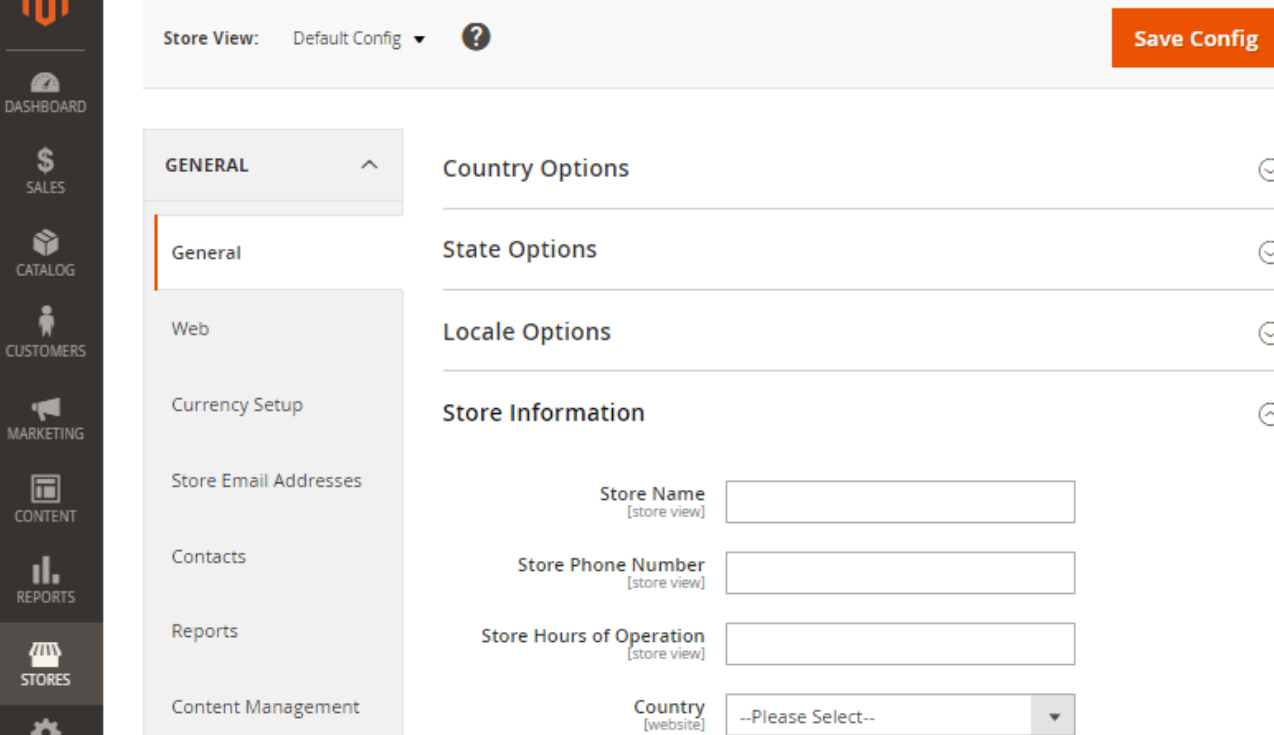
<h5 style="color:red;">系统学习magento二次开发,推荐小册:<a style="color:blue;" href="https://www.maxiaoke.com/manual/magento_cn_dev.html" target="_blank">《Magento中文全栈二次开发 》</a></h5> <div class="image-container"> <p> <a style="color:blue;" href="https://www.maxiaoke.com/manual/magento_cn_dev.html" target="_blank"> <img src="https://www.maxiaoke.com/uploads/images/20230218/bb9c82995c24d1105676e02f373755f5.jpg" alt="Magento中文全栈二次开发"> </a> </p> </div> <div class="text-container" style="font-size:14px; color:#888"> <p>本小册面向Magento2以上版本,书代码及示例兼容magento2.0-2.4版本。涵盖了magento前端开发,后端开发,magento2主题,magento2重写,magento2 layout,magento2控制器,magento2 block等相关内容,带领您成为magento开发技术专家。</p> </div> <hr><p style="color: rgb(51, 51, 51); font-family: inter-regular, system-ui, -apple-system, BlinkMacSystemFont, &quot;Segoe UI&quot;, Roboto, &quot;Helvetica Neue&quot;, Helvetica, Arial, sans-serif; text-align: justify; text-wrap: wrap; background-color: rgb(255, 255, 255);">本文中我们将介绍商店的管理工具,并介绍配置设置。在这里,我们将学习商店层次结构和配置范围的概念,并建立行业标准和要求的最佳实践。</p><p><span style="text-wrap: nowrap;">学习Magento开发:</span></p><p><span style="text-wrap: nowrap;"><img src="/uploads/images/20230218/bb9c82995c24d1105676e02f373755f5.jpg" title="Man.jpg" alt=""/></span></p><p><span style="text-wrap: nowrap;">点击查看:--&gt;&nbsp; <a href="https://www.maxiaoke.com/manual/magento_cn_dev.html" target="_blank" style="color: rgb(79, 129, 189); text-decoration: underline;"><span style="text-wrap: nowrap; color: rgb(79, 129, 189);"><strong>magento中文全栈二次开发</strong></span></a></span></p><h2 class="h2" style="line-height: 1.3em; font-family: erdana, helvetica, arial, sans-serif; color: rgb(97, 11, 56); font-weight: 400; font-size: 25px; text-align: justify; text-wrap: wrap; background-color: rgb(255, 255, 255);">商店管理员</h2><p style="color: rgb(51, 51, 51); font-family: inter-regular, system-ui, -apple-system, BlinkMacSystemFont, &quot;Segoe UI&quot;, Roboto, &quot;Helvetica Neue&quot;, Helvetica, Arial, sans-serif; text-align: justify; text-wrap: wrap; background-color: rgb(255, 255, 255);">商店管理员是一个受密码保护的后端办公室或仪表板,我们(作为商家)可以在其中设置产品、促销、管理订单以及执行其他管理任务。所有基本配置任务和商店管理操作都由此管理员执行。</p><p style="color: rgb(51, 51, 51); font-family: inter-regular, system-ui, -apple-system, BlinkMacSystemFont, &quot;Segoe UI&quot;, Roboto, &quot;Helvetica Neue&quot;, Helvetica, Arial, sans-serif; text-align: justify; text-wrap: wrap; background-color: rgb(255, 255, 255);">在此默认管理员帐户中,我们可以创建处理商店和支持客户帐户所需的任意数量的其他帐户。每个帐户都可以根据人员的业务需求与特定角色和访问级别相关联。</p><p><img src="/uploads/images/20230626/fa91762ca770aef39e05da9d2de20f7c.png" title="image.png" alt="" width="748" height="430"/></p><h2 class="h2" style="line-height: 1.3em; font-family: erdana, helvetica, arial, sans-serif; color: rgb(97, 11, 56); font-weight: 400; font-size: 25px; text-align: justify; text-wrap: wrap; background-color: rgb(255, 255, 255);">店铺详情</h2><p style="color: rgb(51, 51, 51); font-family: inter-regular, system-ui, -apple-system, BlinkMacSystemFont, &quot;Segoe UI&quot;, Roboto, &quot;Helvetica Neue&quot;, Helvetica, Arial, sans-serif; text-align: justify; text-wrap: wrap; background-color: rgb(255, 255, 255);">商店详细信息是我们可以输入有关我们商店的基本信息的地方,例如商店名称、地址、语言、商店联系电话、国家、州和货币等。</p><p><img src="/uploads/images/20230626/37dfec9885a2e51048e6c9c7992a998a.png" title="image.png" alt="" width="727" height="411"/></p><h2 class="h2" style="line-height: 1.3em; font-family: erdana, helvetica, arial, sans-serif; color: rgb(97, 11, 56); font-weight: 400; font-size: 25px; text-align: justify; text-wrap: wrap; background-color: rgb(255, 255, 255);">店面品牌</h2><p style="color: rgb(51, 51, 51); font-family: inter-regular, system-ui, -apple-system, BlinkMacSystemFont, &quot;Segoe UI&quot;, Roboto, &quot;Helvetica Neue&quot;, Helvetica, Arial, sans-serif; text-align: justify; text-wrap: wrap; background-color: rgb(255, 255, 255);">这是具有<span style="font-family: inter-bold, system-ui, -apple-system, BlinkMacSystemFont, &quot;Segoe UI&quot;, Roboto, &quot;Helvetica Neue&quot;, Helvetica, Arial, sans-serif; font-weight: 700;">Luma</span>主题的店面视图。我们要更改的第一件事是标题中的徽标,并为浏览器上传图标。我们还想在页脚中更新下面的版权声明。这些是我们首先需要做的基本任务。</p><p><img src="/uploads/images/20230626/3b3f1f38024ca569fb24037d75e1c6a5.png" title="image.png" alt="" width="694" height="449"/></p><p><br/></p><p style="color: rgb(51, 51, 51); font-family: inter-regular, system-ui, -apple-system, BlinkMacSystemFont, &quot;Segoe UI&quot;, Roboto, &quot;Helvetica Neue&quot;, Helvetica, Arial, sans-serif; text-align: justify; text-wrap: wrap; background-color: rgb(255, 255, 255);">要更改上述版本的Magento 2.1 +中的徽标和默认消息,请执行以下步骤:</p><p style="color: rgb(51, 51, 51); font-family: inter-regular, system-ui, -apple-system, BlinkMacSystemFont, &quot;Segoe UI&quot;, Roboto, &quot;Helvetica Neue&quot;, Helvetica, Arial, sans-serif; text-align: justify; text-wrap: wrap; background-color: rgb(255, 255, 255);">1.从&nbsp;<span style="font-family: inter-bold, system-ui, -apple-system, BlinkMacSystemFont, &quot;Segoe UI&quot;, Roboto, &quot;Helvetica Neue&quot;, Helvetica, Arial, sans-serif; font-weight: 700;">favicon.io</span>&nbsp;网站创建16 * 16或32 * 32的徽标。</p><p style="color: rgb(51, 51, 51); font-family: inter-regular, system-ui, -apple-system, BlinkMacSystemFont, &quot;Segoe UI&quot;, Roboto, &quot;Helvetica Neue&quot;, Helvetica, Arial, sans-serif; text-align: justify; text-wrap: wrap; background-color: rgb(255, 255, 255);">2. 在管理员侧边栏上,单击内容。在“设计”下选择配置。</p><p><img src="/uploads/images/20230626/389f23e1ea6eb29431ebc36ff134cab0.png" title="image.png" alt="" width="702" height="285"/></p><p><span style="color: rgb(51, 51, 51); font-family: inter-regular, system-ui, -apple-system, BlinkMacSystemFont, &quot;Segoe UI&quot;, Roboto, &quot;Helvetica Neue&quot;, Helvetica, Arial, sans-serif; text-align: justify; text-wrap: wrap; background-color: rgb(255, 255, 255);">3. 在“设计配置面板”中,单击当前网站的“编辑”。</span></p><p><span style="color: rgb(51, 51, 51); font-family: inter-regular, system-ui, -apple-system, BlinkMacSystemFont, &quot;Segoe UI&quot;, Roboto, &quot;Helvetica Neue&quot;, Helvetica, Arial, sans-serif; text-align: justify; text-wrap: wrap; background-color: rgb(255, 255, 255);"><img src="/uploads/images/20230626/9afc0410ba338abb011f8327373bd018.png" title="image.png" alt="" width="705" height="284"/></span></p><p><span style="color: rgb(51, 51, 51); font-family: inter-regular, system-ui, -apple-system, BlinkMacSystemFont, &quot;Segoe UI&quot;, Roboto, &quot;Helvetica Neue&quot;, Helvetica, Arial, sans-serif; text-align: justify; text-wrap: wrap; background-color: rgb(255, 255, 255);"></span></p><p style="color: rgb(51, 51, 51); font-family: inter-regular, system-ui, -apple-system, BlinkMacSystemFont, &quot;Segoe UI&quot;, Roboto, &quot;Helvetica Neue&quot;, Helvetica, Arial, sans-serif; text-align: justify; text-wrap: wrap; background-color: rgb(255, 255, 255);">4.探索其他设置部分下的HTML Head,然后从此处上传图标。</p><p style="color: rgb(51, 51, 51); font-family: inter-regular, system-ui, -apple-system, BlinkMacSystemFont, &quot;Segoe UI&quot;, Roboto, &quot;Helvetica Neue&quot;, Helvetica, Arial, sans-serif; text-align: justify; text-wrap: wrap; background-color: rgb(255, 255, 255);">5. 单击上传以浏览文件夹中的徽标,选择徽标后,单击<span style="font-family: inter-bold, system-ui, -apple-system, BlinkMacSystemFont, &quot;Segoe UI&quot;, Roboto, &quot;Helvetica Neue&quot;, Helvetica, Arial, sans-serif; font-weight: 700;">保存配置</span>。</p><p><span style="color: rgb(51, 51, 51); font-family: inter-regular, system-ui, -apple-system, BlinkMacSystemFont, &quot;Segoe UI&quot;, Roboto, &quot;Helvetica Neue&quot;, Helvetica, Arial, sans-serif; text-align: justify; text-wrap: wrap; background-color: rgb(255, 255, 255);"></span><img src="/uploads/images/20230626/53dbb20a8882a1b02de4d4ab208d53ab.png" title="image.png" alt="" width="705" height="375"/></p><p style="color: rgb(51, 51, 51); font-family: inter-regular, system-ui, -apple-system, BlinkMacSystemFont, &quot;Segoe UI&quot;, Roboto, &quot;Helvetica Neue&quot;, Helvetica, Arial, sans-serif; text-align: justify; text-wrap: wrap; background-color: rgb(255, 255, 255);">6.探索HTML标题部分下方的标题部分,然后从此处更改默认消息。</p><p style="color: rgb(51, 51, 51); font-family: inter-regular, system-ui, -apple-system, BlinkMacSystemFont, &quot;Segoe UI&quot;, Roboto, &quot;Helvetica Neue&quot;, Helvetica, Arial, sans-serif; text-align: justify; text-wrap: wrap; background-color: rgb(255, 255, 255);">7. 在欢迎文本字段中写入默认文本。</p><p><img src="/uploads/images/20230626/29ff81be6e07d24f12188bf7af794fc7.png" title="image.png" alt="" width="702" height="412"/></p><p><span style="color: rgb(51, 51, 51); font-family: inter-regular, system-ui, -apple-system, BlinkMacSystemFont, &quot;Segoe UI&quot;, Roboto, &quot;Helvetica Neue&quot;, Helvetica, Arial, sans-serif; text-align: justify; text-wrap: wrap; background-color: rgb(255, 255, 255);">8.现在进入系统-&gt;缓存管理。标记页面缓存,然后从下拉列表中选择刷新,然后单击提交。</span></p><p><span style="color: rgb(51, 51, 51); font-family: inter-regular, system-ui, -apple-system, BlinkMacSystemFont, &quot;Segoe UI&quot;, Roboto, &quot;Helvetica Neue&quot;, Helvetica, Arial, sans-serif; text-align: justify; text-wrap: wrap; background-color: rgb(255, 255, 255);"><img src="/uploads/images/20230626/4e0afd4574370bda5c26c733af175ad4.png" title="image.png" alt="" width="700" height="385"/></span></p><p><span style="color: rgb(51, 51, 51); font-family: inter-regular, system-ui, -apple-system, BlinkMacSystemFont, &quot;Segoe UI&quot;, Roboto, &quot;Helvetica Neue&quot;, Helvetica, Arial, sans-serif; text-align: justify; text-wrap: wrap; background-color: rgb(255, 255, 255);"><span style="color: rgb(51, 51, 51); font-family: inter-regular, system-ui, -apple-system, BlinkMacSystemFont, &quot;Segoe UI&quot;, Roboto, &quot;Helvetica Neue&quot;, Helvetica, Arial, sans-serif; text-align: justify; text-wrap: wrap; background-color: rgb(255, 255, 255);">检查前端的徽标和默认消息是否已更改。</span></span></p><p><span style="color: rgb(51, 51, 51); font-family: inter-regular, system-ui, -apple-system, BlinkMacSystemFont, &quot;Segoe UI&quot;, Roboto, &quot;Helvetica Neue&quot;, Helvetica, Arial, sans-serif; text-align: justify; text-wrap: wrap; background-color: rgb(255, 255, 255);"><span style="color: rgb(51, 51, 51); font-family: inter-regular, system-ui, -apple-system, BlinkMacSystemFont, &quot;Segoe UI&quot;, Roboto, &quot;Helvetica Neue&quot;, Helvetica, Arial, sans-serif; text-align: justify; text-wrap: wrap; background-color: rgb(255, 255, 255);"><img src="/uploads/images/20230626/730ac23db037e8ea8389059933ed0c58.png" title="image.png" alt="" width="685" height="327"/></span></span></p><p><br/></p><h2 class="h2" style="line-height: 1.3em; font-family: erdana, helvetica, arial, sans-serif; color: rgb(97, 11, 56); font-weight: 400; font-size: 25px; text-align: justify; text-wrap: wrap; background-color: rgb(255, 255, 255);">网站、商店和视图</h2><p style="color: rgb(51, 51, 51); font-family: inter-regular, system-ui, -apple-system, BlinkMacSystemFont, &quot;Segoe UI&quot;, Roboto, &quot;Helvetica Neue&quot;, Helvetica, Arial, sans-serif; text-align: justify; text-wrap: wrap; background-color: rgb(255, 255, 255);">Magento具有网站,商店和商店视图的层次结构,这些视图具有一对多关系。单个安装可以具有多个网站,并且每个网站可以具有多个商店和商店视图。Magento 2允许我们运行多个网站,具有不同视图的商店。</p><p><img src="/uploads/images/20230626/0b4fcb77eaefda999306f1515a0434b6.png" title="image.png" alt="" width="739" height="222"/></p><p style="text-align: start;"><span style="text-align: justify; text-wrap: wrap; background-color: rgb(255, 255, 255);"><span style="text-align: justify; text-wrap: wrap; background-color: rgb(255, 255, 255);"><br/></span></span></p><p style="text-align: start;"><br/></p><p style="color: rgb(51, 51, 51); font-family: inter-regular, system-ui, -apple-system, BlinkMacSystemFont, &quot;Segoe UI&quot;, Roboto, &quot;Helvetica Neue&quot;, Helvetica, Arial, sans-serif; text-align: justify; text-wrap: wrap; background-color: rgb(255, 255, 255);">默认情况下,Magento最初有一个名为“<span style="font-family: inter-bold, system-ui, -apple-system, BlinkMacSystemFont, &quot;Segoe UI&quot;, Roboto, &quot;Helvetica Neue&quot;, Helvetica, Arial, sans-serif; font-weight: 700;">主网站</span>”的网站。我们还可以创建多个网站,每个网站都有自己的IP地址和域。</p><p class="pq" style="font-size: 15px; color: rgb(51, 51, 51); font-family: inter-regular, system-ui, -apple-system, BlinkMacSystemFont, &quot;Segoe UI&quot;, Roboto, &quot;Helvetica Neue&quot;, Helvetica, Arial, sans-serif; text-align: justify; text-wrap: wrap; background-color: rgb(255, 255, 255);"><span style="font-family: inter-bold, system-ui, -apple-system, BlinkMacSystemFont, &quot;Segoe UI&quot;, Roboto, &quot;Helvetica Neue&quot;, Helvetica, Arial, sans-serif; font-weight: 700;">商店</span></p><p style="color: rgb(51, 51, 51); font-family: inter-regular, system-ui, -apple-system, BlinkMacSystemFont, &quot;Segoe UI&quot;, Roboto, &quot;Helvetica Neue&quot;, Helvetica, Arial, sans-serif; text-align: justify; text-wrap: wrap; background-color: rgb(255, 255, 255);">一个网站可以有多个商店,每个商店都有自己的主菜单。这些商店共享相同的产品目录,但可以有不同的设计和产品选择。同一网站下的所有商店共享相同的管理员和结帐。</p><p class="pq" style="font-size: 15px; color: rgb(51, 51, 51); font-family: inter-regular, system-ui, -apple-system, BlinkMacSystemFont, &quot;Segoe UI&quot;, Roboto, &quot;Helvetica Neue&quot;, Helvetica, Arial, sans-serif; text-align: justify; text-wrap: wrap; background-color: rgb(255, 255, 255);"><span style="font-family: inter-bold, system-ui, -apple-system, BlinkMacSystemFont, &quot;Segoe UI&quot;, Roboto, &quot;Helvetica Neue&quot;, Helvetica, Arial, sans-serif; font-weight: 700;">商店视图</span></p><p style="color: rgb(51, 51, 51); font-family: inter-regular, system-ui, -apple-system, BlinkMacSystemFont, &quot;Segoe UI&quot;, Roboto, &quot;Helvetica Neue&quot;, Helvetica, Arial, sans-serif; text-align: justify; text-wrap: wrap; background-color: rgb(255, 255, 255);">每个可供客户使用的商店都根据特定视图显示。最初,商店具有单个默认视图。我们可以为不同的语言、设计和布局创建商店视图。每个视图都可以有其域、外观和语言,同时共享客户数据、结帐、文章和购物车。</p><h2 class="h2" style="line-height: 1.3em; font-family: erdana, helvetica, arial, sans-serif; color: rgb(97, 11, 56); font-weight: 400; font-size: 25px; text-align: justify; text-wrap: wrap; background-color: rgb(255, 255, 255);">行业合规</h2><p style="color: rgb(51, 51, 51); font-family: inter-regular, system-ui, -apple-system, BlinkMacSystemFont, &quot;Segoe UI&quot;, Roboto, &quot;Helvetica Neue&quot;, Helvetica, Arial, sans-serif; text-align: justify; text-wrap: wrap; background-color: rgb(255, 255, 255);">Magento 2提供安全和隐私功能,符合在线商家的法律要求和行业准则。某些政策由支付卡行业强制要求,而其他政策则由法律要求,具体取决于您所在的位置。</p><p style="text-align: start;"><span style="text-align: justify; text-wrap: wrap; background-color: rgb(255, 255, 255);"><span style="text-align: justify; text-wrap: wrap; background-color: rgb(255, 255, 255);"><br/></span></span><br/></p>

一文读懂Magento的系统架构及分层结构

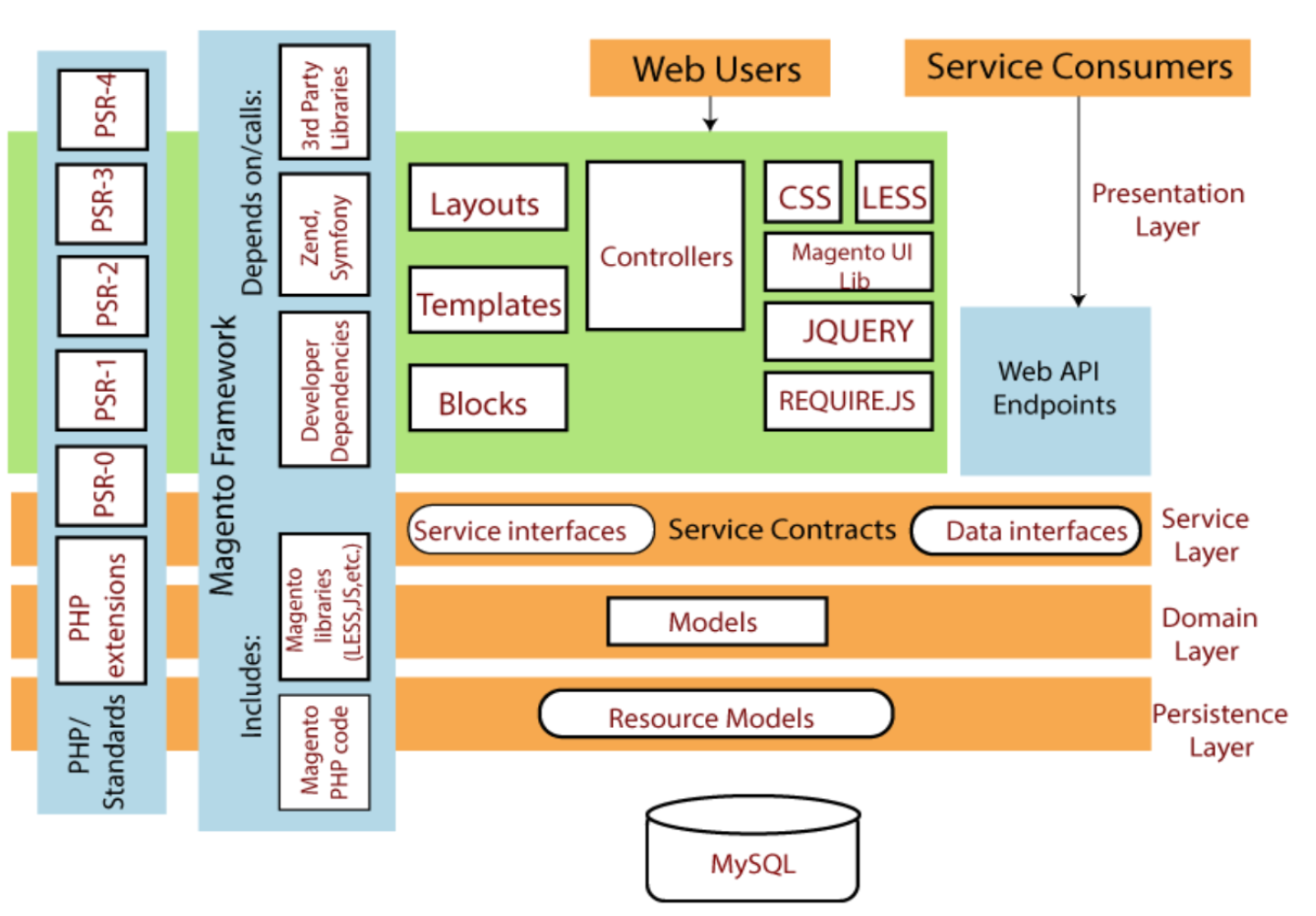
<h5 style="color:red;">系统学习magento二次开发,推荐小册:<a style="color:blue;" href="https://www.maxiaoke.com/manual/magento_cn_dev.html" target="_blank">《Magento中文全栈二次开发 》</a></h5> <div class="image-container"> <p> <a style="color:blue;" href="https://www.maxiaoke.com/manual/magento_cn_dev.html" target="_blank"> <img src="https://www.maxiaoke.com/uploads/images/20230218/bb9c82995c24d1105676e02f373755f5.jpg" alt="Magento中文全栈二次开发"> </a> </p> </div> <div class="text-container" style="font-size:14px; color:#888"> <p>本小册面向Magento2以上版本,书代码及示例兼容magento2.0-2.4版本。涵盖了magento前端开发,后端开发,magento2主题,magento2重写,magento2 layout,magento2控制器,magento2 block等相关内容,带领您成为magento开发技术专家。</p> </div> <hr><p style="color: rgb(51, 51, 51); font-family: inter-regular, system-ui, -apple-system, BlinkMacSystemFont, &quot;Segoe UI&quot;, Roboto, &quot;Helvetica Neue&quot;, Helvetica, Arial, sans-serif; text-align: justify; text-wrap: wrap; background-color: rgb(255, 255, 255);">在本主题中,我们将讨论Magento 2的体系结构。Magento 2的架构与Magento 1完全不同。它的架构旨在使源代码尽可能广泛和模块化。这种方法的主要目的是允许它根据项目的需要轻松调整和定制。每个业务逻辑和功能都以模块的形式设计。因此,每个模块都可以作为一个独立的单元工作。</p><p style="color: rgb(51, 51, 51); font-family: inter-regular, system-ui, -apple-system, BlinkMacSystemFont, &quot;Segoe UI&quot;, Roboto, &quot;Helvetica Neue&quot;, Helvetica, Arial, sans-serif; text-align: justify; text-wrap: wrap; background-color: rgb(255, 255, 255);">Magento 2具有<span style="font-family: inter-bold, system-ui, -apple-system, BlinkMacSystemFont, &quot;Segoe UI&quot;, Roboto, &quot;Helvetica Neue&quot;, Helvetica, Arial, sans-serif; font-weight: 700;">Model View ViewModel(MVVM)架构</span>。此 MVVM 体系结构在模型层和视图层之间提供了更强大的分离,因为它与模型视图控制器 (MVC) 密切相关。MVVC 的简要说明如下:</p><p><span style="color: rgb(51, 51, 51); font-family: inter-regular, system-ui, -apple-system, BlinkMacSystemFont, &quot;Segoe UI&quot;, Roboto, &quot;Helvetica Neue&quot;, Helvetica, Arial, sans-serif; text-align: justify; text-wrap: wrap; background-color: rgb(255, 255, 255);"></span></p><p><img src="/uploads/images/20230626/3dccf6ab715b8a5cdd4e4cb693875a9f.png" title="image.png" alt="" width="659" height="154"/></p><p style="color: rgb(51, 51, 51); font-family: inter-regular, system-ui, -apple-system, BlinkMacSystemFont, &quot;Segoe UI&quot;, Roboto, &quot;Helvetica Neue&quot;, Helvetica, Arial, sans-serif; text-align: justify; text-wrap: wrap; background-color: rgb(255, 255, 255);"><span style="font-family: inter-bold, system-ui, -apple-system, BlinkMacSystemFont, &quot;Segoe UI&quot;, Roboto, &quot;Helvetica Neue&quot;, Helvetica, Arial, sans-serif; font-weight: 700;">型:</span>它保存应用程序的业务逻辑,并依赖于用于数据库访问的关联类 - 资源模型。与MVC类似,它是应用程序操作所必需的数据管理和基本数据描述的逻辑。模型响应来自视图的请求。</p><p style="color: rgb(51, 51, 51); font-family: inter-regular, system-ui, -apple-system, BlinkMacSystemFont, &quot;Segoe UI&quot;, Roboto, &quot;Helvetica Neue&quot;, Helvetica, Arial, sans-serif; text-align: justify; text-wrap: wrap; background-color: rgb(255, 255, 255);"><span style="font-family: inter-bold, system-ui, -apple-system, BlinkMacSystemFont, &quot;Segoe UI&quot;, Roboto, &quot;Helvetica Neue&quot;, Helvetica, Arial, sans-serif; font-weight: 700;">视图:</span>该视图是用户在屏幕上看到的图形界面。它负责显示对用户请求的响应。视图是一种结构或布局,它以特定格式表示数据。视图指定“数据的外观”。它是 ViewModel 提供的属性值或命令更改的订阅者。</p><p style="color: rgb(51, 51, 51); font-family: inter-regular, system-ui, -apple-system, BlinkMacSystemFont, &quot;Segoe UI&quot;, Roboto, &quot;Helvetica Neue&quot;, Helvetica, Arial, sans-serif; text-align: justify; text-wrap: wrap; background-color: rgb(255, 255, 255);"><span style="font-family: inter-bold, system-ui, -apple-system, BlinkMacSystemFont, &quot;Segoe UI&quot;, Roboto, &quot;Helvetica Neue&quot;, Helvetica, Arial, sans-serif; font-weight: 700;">视图模型:</span>视图模型与模型层交互,并仅向视图层公开必要的信息。这是由Magento 2中模块的Block类处理的。需要注意的重要一点是,这通常是 MVC 系统的控制器角色的一部分。在 MVVM 中,控制器只负责处理用户流,这意味着它接收请求并告诉系统呈现视图或将用户重定向到另一个路由。</p><p style="color: rgb(51, 51, 51); font-family: inter-regular, system-ui, -apple-system, BlinkMacSystemFont, &quot;Segoe UI&quot;, Roboto, &quot;Helvetica Neue&quot;, Helvetica, Arial, sans-serif; text-align: justify; text-wrap: wrap; background-color: rgb(255, 255, 255);">它包含一个模型,该模型被转换为视图,还包含可用于影响模型的命令。视图模型基本上是公开公共属性和命令的视图的抽象。</p><p style="color: rgb(51, 51, 51); font-family: inter-regular, system-ui, -apple-system, BlinkMacSystemFont, &quot;Segoe UI&quot;, Roboto, &quot;Helvetica Neue&quot;, Helvetica, Arial, sans-serif; text-align: justify; text-wrap: wrap; background-color: rgb(255, 255, 255);">根据官方文档,Magento 2分为四层。</p><ul class="points list-paddingleft-2" style="list-style-type: circle;"><li><p>表示层</p></li><li><p>服务层</p></li><li><p>域层</p></li><li><p>持久层</p></li></ul><p><img src="/uploads/images/20230626/956786d70156f8c31907e894c6ebafb6.png" title="image.png" alt="" width="935" height="620"/><span style="color: rgb(51, 51, 51); font-family: inter-regular, system-ui, -apple-system, BlinkMacSystemFont, &quot;Segoe UI&quot;, Roboto, &quot;Helvetica Neue&quot;, Helvetica, Arial, sans-serif; text-align: justify; text-wrap: wrap; background-color: rgb(255, 255, 255);"></span></p><p style="color: rgb(51, 51, 51); font-family: inter-regular, system-ui, -apple-system, BlinkMacSystemFont, &quot;Segoe UI&quot;, Roboto, &quot;Helvetica Neue&quot;, Helvetica, Arial, sans-serif; text-align: justify; text-wrap: wrap; background-color: rgb(255, 255, 255);">Magento 2的层架构的详细描述如下。</p><h3 class="h3" style="line-height: 1.3em; font-weight: 400; font-family: erdana, helvetica, arial, sans-serif; color: rgb(97, 11, 75); font-size: 21px; text-align: justify; text-wrap: wrap; background-color: rgb(255, 255, 255);">1) 表示层</h3><p style="color: rgb(51, 51, 51); font-family: inter-regular, system-ui, -apple-system, BlinkMacSystemFont, &quot;Segoe UI&quot;, Roboto, &quot;Helvetica Neue&quot;, Helvetica, Arial, sans-serif; text-align: justify; text-wrap: wrap; background-color: rgb(255, 255, 255);">表示层是Magento 2架构的最上层。当我们与Magento的Web界面交互时,那时,我们正在与表示层代码进行交互。它包含所有控制器和视图元素,例如布局,模板,块和css.js等。表示层通常使用服务协定调用服务层。它可以与业务逻辑重叠。</p><p style="color: rgb(51, 51, 51); font-family: inter-regular, system-ui, -apple-system, BlinkMacSystemFont, &quot;Segoe UI&quot;, Roboto, &quot;Helvetica Neue&quot;, Helvetica, Arial, sans-serif; text-align: justify; text-wrap: wrap; background-color: rgb(255, 255, 255);">Web 用户、系统管理员是表示层的用户</p><h3 class="h3" style="line-height: 1.3em; font-weight: 400; font-family: erdana, helvetica, arial, sans-serif; color: rgb(97, 11, 75); font-size: 21px; text-align: justify; text-wrap: wrap; background-color: rgb(255, 255, 255);">2) 服务层</h3><p style="color: rgb(51, 51, 51); font-family: inter-regular, system-ui, -apple-system, BlinkMacSystemFont, &quot;Segoe UI&quot;, Roboto, &quot;Helvetica Neue&quot;, Helvetica, Arial, sans-serif; text-align: justify; text-wrap: wrap; background-color: rgb(255, 255, 255);">服务层是表示层和域层之间的中间层。它在表示层和域层与特定于资源的数据之间架起了一座桥梁。服务层实现使用 PHP 接口定义的服务协定。这些服务协定允许我们在不破坏系统的情况下添加或更改业务逻辑资源模型。这是使用依赖关系注入配置文件 (di.xml) 完成的。</p><p style="color: rgb(51, 51, 51); font-family: inter-regular, system-ui, -apple-system, BlinkMacSystemFont, &quot;Segoe UI&quot;, Roboto, &quot;Helvetica Neue&quot;, Helvetica, Arial, sans-serif; text-align: justify; text-wrap: wrap; background-color: rgb(255, 255, 255);">服务层授予对 API(REST/SOAP 或其他模块)的访问权限。它位于域层上方和表示层下方。</p><h3 class="h3" style="line-height: 1.3em; font-weight: 400; font-family: erdana, helvetica, arial, sans-serif; color: rgb(97, 11, 75); font-size: 21px; text-align: justify; text-wrap: wrap; background-color: rgb(255, 255, 255);">3) 域层</h3><p style="color: rgb(51, 51, 51); font-family: inter-regular, system-ui, -apple-system, BlinkMacSystemFont, &quot;Segoe UI&quot;, Roboto, &quot;Helvetica Neue&quot;, Helvetica, Arial, sans-serif; text-align: justify; text-wrap: wrap; background-color: rgb(255, 255, 255);">域层负责业务逻辑。它不包含特定于数据库或特定于资源的信息。域层定义了包含业务逻辑的通用Magento数据对象或模型。此逻辑描述可以对特定类型的数据(如 Customer 对象)执行的操作。</p><p style="color: rgb(51, 51, 51); font-family: inter-regular, system-ui, -apple-system, BlinkMacSystemFont, &quot;Segoe UI&quot;, Roboto, &quot;Helvetica Neue&quot;, Helvetica, Arial, sans-serif; text-align: justify; text-wrap: wrap; background-color: rgb(255, 255, 255);">要使用 MySQL 调用从数据库中检索数据,每个域层模型都有一个对资源模型的引用。</p><h3 class="h3" style="line-height: 1.3em; font-weight: 400; font-family: erdana, helvetica, arial, sans-serif; color: rgb(97, 11, 75); font-size: 21px; text-align: justify; text-wrap: wrap; background-color: rgb(255, 255, 255);">4) 持久层</h3><p style="color: rgb(51, 51, 51); font-family: inter-regular, system-ui, -apple-system, BlinkMacSystemFont, &quot;Segoe UI&quot;, Roboto, &quot;Helvetica Neue&quot;, Helvetica, Arial, sans-serif; text-align: justify; text-wrap: wrap; background-color: rgb(255, 255, 255);">它描述了资源模型,该模型负责使用 CRUD(创建、读取、更新和删除)请求在数据库中提取和修改数据。为了完成这些请求,资源模型包含 SQL 代码。还实现了其他业务逻辑功能。</p><p style="color: rgb(51, 51, 51); font-family: inter-regular, system-ui, -apple-system, BlinkMacSystemFont, &quot;Segoe UI&quot;, Roboto, &quot;Helvetica Neue&quot;, Helvetica, Arial, sans-serif; text-align: justify; text-wrap: wrap; background-color: rgb(255, 255, 255);">例如 - 数据库函数实现和数据验证。</p><p><span style="text-wrap: nowrap;">学习Magento开发:</span></p><p><span style="text-wrap: nowrap;">点击查看:--&gt;&nbsp; <a href="https://www.maxiaoke.com/manual/magento_cn_dev.html" target="_blank" style="color: rgb(0, 112, 192); text-decoration: underline;"><span style="text-wrap: nowrap; color: rgb(0, 112, 192);"><strong>magento中文全栈二次开发</strong></span></a></span></p><p><img src="/uploads/images/20230218/bb9c82995c24d1105676e02f373755f5.jpg" title="Man.jpg" alt=""/></p>

<h5 style="color:red;">系统学习magento二次开发,推荐小册:<a style="color:blue;" href="https://www.maxiaoke.com/manual/magento_cn_dev.html" target="_blank">《Magento中文全栈二次开发 》</a></h5> <div class="image-container"> <p> <a style="color:blue;" href="https://www.maxiaoke.com/manual/magento_cn_dev.html" target="_blank"> <img src="https://www.maxiaoke.com/uploads/images/20230218/bb9c82995c24d1105676e02f373755f5.jpg" alt="Magento中文全栈二次开发"> </a> </p> </div> <div class="text-container" style="font-size:14px; color:#888"> <p>本小册面向Magento2以上版本,书代码及示例兼容magento2.0-2.4版本。涵盖了magento前端开发,后端开发,magento2主题,magento2重写,magento2 layout,magento2控制器,magento2 block等相关内容,带领您成为magento开发技术专家。</p> </div> <hr><h1 class="h1" style="line-height: 1.3em; margin-top: 5px; font-weight: 400; font-family: erdana, helvetica, arial, sans-serif; font-size: 29px; color: rgb(97, 11, 56); text-align: justify; text-wrap: wrap; background-color: rgb(255, 255, 255);">Magento 2的优缺点</h1><p style="color: rgb(51, 51, 51); font-family: inter-regular, system-ui, -apple-system, BlinkMacSystemFont, &quot;Segoe UI&quot;, Roboto, &quot;Helvetica Neue&quot;, Helvetica, Arial, sans-serif; text-align: justify; text-wrap: wrap; background-color: rgb(255, 255, 255);">Magento 2与以前的版本完全不同。Magento 2是一个用户友好的电子商务平台。如果我们想使用Magento 2,那么我们还应该了解它的优缺点。它有优点和一些缺点,如下所示。</p><h2 class="h2" style="line-height: 1.3em; font-family: erdana, helvetica, arial, sans-serif; color: rgb(97, 11, 56); font-weight: 400; font-size: 25px; text-align: justify; text-wrap: wrap; background-color: rgb(255, 255, 255);">优势</h2><ul class="points list-paddingleft-2" style="list-style-type: circle;"><li><p>类别和产品创建比其他更容易、更快捷。</p></li><li><p>它提供了各种模板和主题,允许Magento设计师和商店所有者自定义外观,甚至针对智能手机进行优化。</p></li><li><p>Magento 2提供了惊人的管理界面,这是非常简化的。非技术管理员喜欢这个简化的界面。</p></li><li><p>LESS预处理器和CSS URL有助于提高性能,加快页面加载速度,并使系统与搜索引擎友好。</p></li><li><p>它是开发人员友好的,因为它是根据现代开发逻辑构建的,使开发人员更有效地使用它。</p></li><li><p>Magento 2具有Luma主题,这是一个引人注目的主题,易于学习。使用&nbsp;<span style="font-family: inter-bold, system-ui, -apple-system, BlinkMacSystemFont, &quot;Segoe UI&quot;, Roboto, &quot;Helvetica Neue&quot;, Helvetica, Arial, sans-serif; font-weight: 700;">Luma</span>&nbsp;主题,我们可以在很短的时间内轻松管理我们的在线商店。它还有助于我们提高创建产品、管理订单和客户数据的生产力。</p></li></ul><h2 class="h2" style="line-height: 1.3em; font-family: erdana, helvetica, arial, sans-serif; color: rgb(97, 11, 56); font-weight: 400; font-size: 25px; text-align: justify; text-wrap: wrap; background-color: rgb(255, 255, 255);">缺点</h2><ul class="points list-paddingleft-2" style="list-style-type: circle;"><li><p>Magento 1.x的所有扩展都不适用于Magento 2.0。您需要购买扩展并将它们集成到Magento 2中。</p></li><li><p>Magento 2 Community Edition是免费的,而Magento 2 Enterprise Edition是付费的。您必须为Magento 2企业版付费。</p></li><li><p>由于其复杂性,需要开发专业知识。</p></li><li><p>Magento 1主题“麦迪逊岛”不能转移到Magento 2,它需要从头开始建造,这使得它成为一个昂贵的努力。</p></li><li><p>对于小店来说,它有点贵。Magento 2的企业版价格昂贵。</p></li><li><p>Magento 2需要繁重的服务器,这使得它速度很慢,并且需要大量数据输入才能获得最佳性能。</p></li></ul><p><br/></p><p>学习Magento开发:<br/></p><p>点击查看:--&gt;&nbsp;&nbsp;<a href="https://www.maxiaoke.com/manual/magento_cn_dev.html" target="_blank" style="color: rgb(0, 112, 192); text-decoration: underline;"><span style="color: rgb(0, 112, 192);"><strong>magento企业级开发实战</strong></span></a></p><p><img src="/uploads/images/20230218/bb9c82995c24d1105676e02f373755f5.jpg" title="Man.jpg" alt=""/></p><p><br/></p>

<h5 style="color:red;">系统学习magento二次开发,推荐小册:<a style="color:blue;" href="https://www.maxiaoke.com/manual/magento_cn_dev.html" target="_blank">《Magento中文全栈二次开发 》</a></h5> <div class="image-container"> <p> <a style="color:blue;" href="https://www.maxiaoke.com/manual/magento_cn_dev.html" target="_blank"> <img src="https://www.maxiaoke.com/uploads/images/20230218/bb9c82995c24d1105676e02f373755f5.jpg" alt="Magento中文全栈二次开发"> </a> </p> </div> <div class="text-container" style="font-size:14px; color:#888"> <p>本小册面向Magento2以上版本,书代码及示例兼容magento2.0-2.4版本。涵盖了magento前端开发,后端开发,magento2主题,magento2重写,magento2 layout,magento2控制器,magento2 block等相关内容,带领您成为magento开发技术专家。</p> </div> <hr><h5 style="color:red;">系统学习shopify开发,推荐小册:<a style="color:blue;" href="https://www.maxiaoke.com/manual/shopify_dev.html" target="_blank">《Shopify应用实战开发》</a></h5> <div class="image-container"> <p> <a style="color:blue;" href="https://www.maxiaoke.com/manual/shopify_dev.html" target="_blank"> <img src="https://www.maxiaoke.com/uploads/images/20230612/03b58362c0718203696abbd7c748a136.jpg" alt="Shopify应用实战开发"> </a> </p> </div> <div class="text-container" style="font-size:14px; color:#888"> <p>这本小册将领您进入 Shopify 平台,学习开发出Shopify应用程序。作为全球最受欢迎的电子商务平台之一,Shopify 提供了一个强大的基础架构,让开发者可以创建个性化、功能丰富的在线商店。本课程将专注于 Shopify 应用开发,为您提供全面的指导和实践机会,打造功能齐全的app,帮助商家实现收益增长,作为个人开发者从中赚取收益。</p> </div> <hr><h5 style="color:red;">系统学习shopify开发,推荐小册:<a style="color:blue;" href="https://www.maxiaoke.com/manual/shopify_dev.html" target="_blank">《Shopify应用实战开发》</a></h5> <div class="image-container"> <p> <a style="color:blue;" href="https://www.maxiaoke.com/manual/shopify_dev.html" target="_blank"> <img src="https://www.maxiaoke.com/uploads/images/20230612/03b58362c0718203696abbd7c748a136.jpg" alt="Shopify应用实战开发"> </a> </p> </div> <div class="text-container" style="font-size:14px; color:#888"> <p>这本小册将领您进入 Shopify 平台,学习开发出Shopify应用程序。作为全球最受欢迎的电子商务平台之一,Shopify 提供了一个强大的基础架构,让开发者可以创建个性化、功能丰富的在线商店。本课程将专注于 Shopify 应用开发,为您提供全面的指导和实践机会,打造功能齐全的app,帮助商家实现收益增长,作为个人开发者从中赚取收益。</p> </div> <hr><h5 style="color:red;">系统学习shopify开发,推荐小册:<a style="color:blue;" href="https://www.maxiaoke.com/manual/shopify_dev.html" target="_blank">《Shopify应用实战开发》</a></h5> <div class="image-container"> <p> <a style="color:blue;" href="https://www.maxiaoke.com/manual/shopify_dev.html" target="_blank"> <img src="https://www.maxiaoke.com/uploads/images/20230612/03b58362c0718203696abbd7c748a136.jpg" alt="Shopify应用实战开发"> </a> </p> </div> <div class="text-container" style="font-size:14px; color:#888"> <p>这本小册将领您进入 Shopify 平台,学习开发出Shopify应用程序。作为全球最受欢迎的电子商务平台之一,Shopify 提供了一个强大的基础架构,让开发者可以创建个性化、功能丰富的在线商店。本课程将专注于 Shopify 应用开发,为您提供全面的指导和实践机会,打造功能齐全的app,帮助商家实现收益增长,作为个人开发者从中赚取收益。</p> </div> <hr><p>首先,我们来比较一下Shopify和Magento这两个电商平台的优劣势。</p><p>Shopify有以下优势:</p><p>1)超过100个令人惊叹的移动店面主题。所有的主题都会自动适应不同设备和屏幕尺寸,非常适合移动购物者。研究表明,在18-39岁之间的消费者中,有69%的人会在购买前使用移动设备研究产品。即使最终在PC上完成购买,产品在移动设备上的展示也非常重要,可以促进客户转化。</p><p>2)具有大型应用商店的综合电子商务网站构建工具,可以扩展网站功能。Shopify就像是网站版本的Apple App Store,可以在智能手机上做更多事情。3)提供易于使用的24/7支持,通过实时聊天和电子邮件提供帮助。</p><p>然而,Shopify也存在一些劣势:</p><p>1)只有10个主题是免费的,如果你想要更多选择,就需要投资购买优质主题。2)集成大量应用程序可能会增加商店的复杂性。3)他们对每笔交易收取交易费。</p><p>接下来,我们看看Magento的优势:1)有一个庞大的用户社区,提供全面的支持。如果你遇到问题,可以在Magento论坛上找到解决方案,并搜索用户生成的内容数据库。</p><p>2)Magento是一个非常灵活的平台,可以提供完全的自由度,没有对商店设计的限制。3)Magento是开源平台,可以免费使用。</p><p>然而,Magento也存在一些劣势:</p><p>1)需要编程知识才能使用。</p><p>2)需要投入大量时间来使商店运行起来。</p><p>综合性能对比方面,我们可以得出以下结论:</p><p>1)Shopify比Magento更易于使用,并提供出色的帮助和支持。Magento功能强大,但技术要求更高,因此难以充分利用其潜力。Magento没有官方支持,但可以依靠用户论坛获得帮助。</p><p>2)在主题方面,Shopify胜出。他们提供的主题选择更广泛,通常更现代化,而Magento的主题则注重功能性。两个平台都提供免费和付费主题。</p><p>3)在附加组件方面,Magento拥有超过5,000个扩展名,可以帮助扩展商店功能。Shopify虽然数量较少,但对于大多数商店来说已经足够。</p><p>4)对于快速、轻松设置付款处理</p><p><br/></p><p>学习magento开发:</p><p><img src="/uploads/images/20230218/bb9c82995c24d1105676e02f373755f5.jpg" title="Man.jpg" alt=""/></p><p>详情查看 --&gt;&nbsp;<a href="https://www.maxiaoke.com/manual/magento_cn_dev.html" target="_blank" style="color: rgb(79, 129, 189); text-decoration: underline;"><span style="color: rgb(79, 129, 189);"><strong>magento企业级开发实战</strong></span></a></p><p><br/></p><p>学习Shopify开发:</p><p><img src="/uploads/images/20230612/03b58362c0718203696abbd7c748a136.jpg" title="fm2.jpg" alt=""/></p><p>详情查看 --&gt;&nbsp;&nbsp;<a href="https://www.maxiaoke.com/manual/magento_cn_dev.html" target="_self" style="color: rgb(79, 129, 189); text-decoration: underline;"><span style="color: rgb(79, 129, 189);"><strong>shopify应用实战开发</strong></span></a></p><p><br/></p><p><br/></p>

<p>OpenAI的API提供商在API使用方面有一些限制和规定,其中之一就是限制API的使用速率,以避免滥用和过度消耗资源。这种限制称为速率限制(Rate Limit),是许多API服务提供商都采用的一种机制。</p><p>OpenAI的速率限制规定了每个API端点可以接受的请求数量和时间间隔。根据OpenAI的API服务计划,不同的用户类型(如开发者、企业等)可以获得不同的速率限制,也可以根据实际需求进行定制。如果用户的请求超过了速率限制,OpenAI的API将返回一个错误响应,告知用户暂时无法处理请求。</p><p>为了避免速率限制对用户造成不必要的影响,建议用户在使用OpenAI的API时遵循以下几点:</p><p>遵守OpenAI的API使用政策和服务条款。</p><p>根据自身需求选择合适的API服务计划,以获得更高的速率限制。</p><p>通过优化请求参数和减少重复请求等方式,尽可能减少API的使用次数。</p><p>在进行大规模或高频次的API请求时,采用分布式或异步处理方式,以提高效率和并发性。</p><p>监控API使用情况和响应状态,及时调整请求速率和处理策略,避免出现错误和超时等问题。</p><p><br/></p>

<p>OpenAI的内容审核(Moderation)技术是一种基于深度学习的自然语言处理技术,可以自动审核文本、图像和视频等内容,识别其中的不良信息、仇恨言论、暴力内容、色情内容等,并对其进行过滤或标记。这项技术可以帮助社交媒体平台、在线论坛、游戏开发商等管理和维护内容的质量和安全性。</p><p>OpenAI的内容审核技术基于深度神经网络和自然语言处理技术,利用训练数据集和人工标注的数据,学习如何识别和分类不良内容,并根据预设的规则和标准,对其进行过滤、标记或删除等操作。该技术具有高的准确度和可靠性,并能够根据用户反馈和监管机构的要求进行持续改进和优化。</p><p>在使用OpenAI的内容审核技术时,需要注意保护用户的隐私和言论自由,避免误判和滥用等问题。因此,在选择和使用内容审核技术时,需要综合考虑技术的准确度、稳定性、可靠性、透明度等因素,并制定相应的政策和标准,以确保审核结果的公正性和合法性。</p><p><br/></p>