文章列表


Python3网络爬虫-使用代理的基本原理

<p>在进行网络爬虫时,经常会提到“代理”一词,那么究竟什么是代理?代理服务器是如何进行工作的?代理有什么作用?如何对代理服务进行设置?这一节就来解决这些问题。</p><p>2.5.1 基本原理</p><p>首先来看什么是代理。代理实际上指的就是代理服务器(Proxy Server),它的功能是代理网络用户获取网络信息。形象地说,代理服务器就是网络信息的中转站。</p><p>在用户正常请求一个网站时,发送了请求给Web服务器,Web服务器把响应传回给用户。如果设置了代理服务器,实际上就是在本机和服务器之间搭建了一个桥,此时本机不是直接向Web服务器发起请求,而是向代理服务器发起请求,请求会发送给代理服务器,然后由代理服务器再发送给Web服务器,接着由代理服务器把Web服务器返回的响应转发给本机。</p><p>这样用户同样可以正常访问网页,但在这个过程中,Web服务器识别出的真实IP就不再是用户本机的IP了,成功实现了IP伪装,这就是代理的基本原理。</p><p>2.5.2 代理的作用</p><p>(1)代理可以突破自身IP访问限制,访问一些平时不能访问的站点。比如网上常说的翻墙、科学上网之类就是使用了代理技术。</p><p>(2)使用代理可以访问一些单位或团体的内部资源。比如使用的如果是教育网内地址段的免费代理服务器,就可以对教育网开放各类FTP下载、上传,以及各类资料查询、共享等服务。</p><p>(3)使用代理可以提高访问速度。通常代理服务器都会设置一个较大的硬盘缓冲区,当有外界的信息通过时,同时也会将其保存到缓冲区中,当其他用户再访问相同的信息时,则直接从缓冲区中取出信息传给用户,以提高访问速度。</p><p>(4)使用代理可以隐藏真实IP。上网者可以通过代理服务隐藏自己的IP,进而免受攻击。对于爬虫来说,使用代理就是为了隐藏自身IP,防止自身的IP被封锁。因为通常大数据量的访问会引起对方主机的怀疑,从而有可能造成封锁IP的访问权限。</p><p>2.5.3 代理分类</p><p>按照代理不同的分类标准,可以对代理进行不同的分类,既可以根据协议区分,又可以根据其匿名程度区分。</p><p>(1)FTP代理服务器:主要用于访问FTP服务器,一般有上传、下载以及缓存功能,端口一般为21、2121等。</p><p>(2)HTTP代理服务器:主要用于访问网页,一般有内容过滤和缓存功能,端口一般为80、8080、3128等。</p><p>(3)SSL/TLS代理:主要用于访问加密网站,一般有SSL或TLS加密功能(最高支持128位加密强度),端口一般为443。</p><p>(4)RTSP代理:主要用于访问Real流媒体服务器,一般有缓存功能,端口一般为554。</p><p>(5)Telnet代理:主要用于Telnet远程控制(黑客入侵计算机时常用于隐藏身份),端口一般为23。</p><p>(6)POP3/SMTP代理:主要用于POP3/SMTP方式收发邮件,一般有缓存功能,端口一般为110/25。</p><p>(7)SOCKS代理:只是单纯传递数据包,不关心具体协议和用法,所以速度快很多,一般有缓存功能,端口一般为1080。SOCKS代理协议又分为SOCKS 4和SOCKS 5,前者只支持TCP,而后者支持TCP和UDP,还支持各种身份验证机制、服务器端域名解析等。简单来说,SOCK 4能做到的SOCKS 5都可以做到,但SOCKS 5能做到的SOCK 4不一定能做到。</p><p>根据代理的匿名程度,代理可以分为如下类别:</p><p>(1)高度匿名代理:会将数据包原封不动地转发,在服务端看来就好像真的是一个普通的客户端在访问,而记录的IP是代理服务器的IP。</p><p>(2)普通匿名代理:会在数据包上做一些改动,在服务端上有可能发现这是一个代理服务器,也有一定概率追查到客户端的真实IP。代理服务器通常会加入的HTTP头有HTTP_VIA和HTTP_X_FORWARDED_FOR。</p><p>(3)透明代理:不但改动了数据包,还会告诉服务器客户端的真实IP。这种代理除了能用缓存技术提高浏览速度、能用内容过滤提高安全性之外,并无其他显著作用,常见的例子是内网中的硬件防火墙。</p><p>(4)间谍代理:指组织或个人创建的用于记录用户传输的数据,然后进行研究、监控等的代理服务器。</p><p>2.5.4 常见代理设置</p><p>常见的代理设置有以下几种:</p><p>(1)使用网上的免费代理。这种情况最好使用高匿代理,另外可用的代理不多,需要在使用前筛选一下可用代理,也可以进一步维护一个代理池。</p><p>(2)使用付费代理服务。互联网上存在许多代理商,可以付费使用,质量比免费代理好很多,而且速度更快,也更稳定,不过需要支付相应代理服务费。</p><p>(3)使用ADSL拨号。拨一次号换一次IP,稳定性高,是一种比较有效的解决方案。</p><p style="text-wrap: wrap;"><span style="text-wrap: nowrap;">---------------------------------------------------------------------------------</span></p><p style="text-wrap: wrap;"><span style="text-wrap: nowrap;">学习更多专业Python知识,点此查看:</span></p><p style="text-wrap: wrap;"><a href="https://www.maxiaoke.com/manual/py_ssz.html" target="_self"><span style="text-wrap: nowrap;">《剑指Python-上》</span></a><span style="text-wrap: nowrap;">&nbsp;&nbsp;</span><a href="https://www.maxiaoke.com/manual/jz_pys_2.html" target="_self"><span style="text-wrap: nowrap;">《剑指Python-下》</span></a></p><p style="text-wrap: wrap;"><img src="https://www.maxiaoke.com/uploads/images/20231204/a64aeb23219a212638811c5bd0f355b0.png" title="py小册封面.png" alt=""/></p><p style="text-wrap: wrap;"><span style="text-wrap: nowrap;">---------------------------------------------------------------------------------</span></p><p><br/></p>

Python3网络爬虫-用爬虫处理cookie和session

<p>2.4 会话和Cookies</p><p>Cookie是一小段文本信息,伴随着用户请求和页面在Web服务器和浏览器之间传递。用户每次访问站点时,Web应用程序都可以读取Cookie包含的信息。Cookie的基本工作原理:如果用户再次访问站点上的页面,当该用户输入URL地址时,浏览器就会在本地硬盘上查找与该URL相关联的Cookie。如果该Cookie存在,浏览器就将它与页面请求一起发送到用户请求的站点。Cookie根本的用途是:Cookie能够帮助Web站点保存有关访问者的信息。更简单地说,Cookie是一种保持Web应用程序连续性(执行“状态管理”)的方法。</p><p>什么是会话(Session)?当用户访问站点时,服务器会为该用户创建唯一的会话,会话将一直延续到用户访问结束。</p><p>2.4.1 静态网页和动态网页</p><p>静态网页的网址形式通常是以.htm、.html、.shtml、.xml等为后缀的。静态网页一般来说是最简单的HTML网页,服务器端和客户端是一样的,而且没有脚本和小程序,所以它不能动。在HTML格式的网页上,也可以出现各种动态的效果,如.gif格式的动画、FLASH、滚动字母等,这些“动态效果”只是视觉上的,与后面将要介绍的动态网页是不同的概念。</p><p>静态网页有以下特点:(1)静态网页每个网页都有一个固定的URL,且网页URL以.htm、.html、.shtml等常见形式为后缀,而不含有“?”。</p><p>(2)网页内容一经发布到网站服务器上,无论是否有用户访问,每个静态网页的内容都是保存在网站服务器上的,也就是说,静态网页是实实在在保存在服务器上的文件,每个网页都是一个独立的文件。</p><p>(3)静态网页的内容相对稳定,因此容易被搜索引擎检索。</p><p>(4)静态网页没有数据库的支持,在网站制作和维护方面工作量较大,因此当网站信息量很大时,完全依靠静态网页制作方式比较困难。</p><p>(5)静态网页的交互性较差,在功能方面有较大的限制。</p><p>动态网页是以.asp、.jsp、.php、.perl、.cgi等形式为后缀的,并且在动态网页网址中有一个标志性的符号“?”。动态网页与网页上的各种动画、滚动字幕等视觉上的“动态效果”没有直接关系,动态网页可以是纯文字内容,也可以是包含各种动画的内容,这些只是网页具体内容的表现形式,无论网页是否具有动态效果,采用动态网页技术生成的网页都称为动态网页。动态网页也可以采用静动结合的原则,适合采用动态网页的地方采用动态网页,如果需要使用静态网页,就可以考虑用静态网页的方法来实现,在同一个网站上,动态网页内容和静态网页内容同时存在是很常见的事情。</p><p>动态网页具有以下特点:</p><p>(1)交互性,即网页会根据用户的要求和选择而动态改变和响应。例如,访问者在网页上填写表单信息并提交,服务器经过处理将信息自动存储到后台数据库中,并打开相应提示页面。</p><p>(2)自动更新,即无须手动操作,便会自动生成新的页面,可以大大节省工作量。例如,在论坛中发布信息,后台服务器将自动生成新的网页。</p><p>(3)随机性,即当不同的时间、不同的人访问同一网址时会产生不同的页面效果。例如,登录界面自动循环功能。</p><p>(4)动态网页中的“?”对搜索引擎检索存在一定的问题,搜索引擎一般不可能从一个网站的数据库中访问全部网页,或者出于技术方面的考虑,搜索蜘蛛不会去抓取网址中“?”后面的内容,因此采用动态网页的网站在进行搜索引擎推广时,需要做一定的技术处理才能适应搜索引擎的要求。</p><p>静态网页和动态网页各有特点,网站采用动态网页还是静态网页主要取决于网站的功能需求和网站内容的多少,如果网站功能比较简单,内容更新量不是很大,采用纯静态网页的方式会更简单,如果网站功能复杂,那么最好采用动态网页技术来实现。</p><p>2.4.2 无状态HTTP</p><p>HTTP(Hyper Text Transport Protocol,超文本传输协议)是无状态协议。无状态是指协议对于事务处理没有记忆能力。缺少状态意味着如果后续处理需要前面的信息,它就必须重传,这样可能导致每次连接传送的数据量增大。另一方面,在服务器不需要先前信息时,它的应答就较快。</p><p>客户端与服务器进行动态交互的Web应用程序出现之后,HTTP无状态的特性严重阻碍了这些应用程序的实现,毕竟交互是需要承前启后的,简单的购物车程序也要知道用户到底在之前选择了什么商品。于是,两种用于保持HTTP连接状态的技术就应运而生了,一个是Cookie,另一个则是Session。</p><p>Cookie是通过客户端保持状态的解决方案。从定义上来说,Cookie就是由服务器发给客户端的特殊信息,这些信息以文本文件的方式存放在客户端,然后客户端每次向服务器发送请求的时候都会带上这些特殊的信息。讲得更具体一些:当用户使用浏览器访问一个支持Cookie的网站的时候,用户会提供包括用户名在内的个人信息并且提交至服务器;接着,服务器在向客户端回传相应的超文本的同时也会发回这些个人信息,当然这些信息并不是存放在HTTP响应体中的,而是存放于HTTP响应头中的;当客户端浏览器接收到来自服务器的响应之后,浏览器会将这些信息存放在一个统一的位置。对于Windows操作系统而言,我们可以从:</p><pre class="brush:as3;toolbar:false">[系统盘]:\Documents&nbsp;and&nbsp;Settings\[用户名]\Cookies</pre><p>目录中找到存储的Cookie。自此,客户端再向服务器发送请求的时候,都会把相应的Cookie再次发回至服务器。而这次,Cookie信息则存放在HTTP请求头中。</p><p>有了Cookie这样的技术实现,服务器在接收到来自客户端浏览器的请求之后,就能够通过分析存放于请求头的Cookie得到客户端特有的信息,从而动态生成与该客户端相对应的内容。通常,我们可以从很多网站的登录界面中看到“请记住我”这样的选项,如果你勾选了该选项之后再登录,那么在下一次访问该网站的时候就不需要进行重复而烦琐的登录动作了,这个功能就是通过Cookie实现的。</p><p>与Cookie相对的一个解决方案是Session,它是通过服务器来保持状态的。由于Session这个词汇包含的语义很多,因此需要在这里明确一下Session的含义。</p><p>首先,我们通常都会把Session翻译成会话,因此可以把客户端浏览器与服务器之间一系列的交互动作称为一个Session。从这个语义出发,我们会想到Session持续的时间,会提到在Session过程中进行了什么操作,等等。</p><p>其次,Session指的是服务器端为客户端所开辟的存储空间,在其中保存的信息就是用于保持状态的。从这个语义出发,我们会提到往Session中存放什么内容,如何根据键值从Session中获取匹配的内容,等等。</p><p>要使用Session,第一步当然是创建Session了。那么Session在何时创建呢?当然是在服务器端程序运行的过程中创建的,不同语言实现的应用程序有不同的创建Session的方法,而在Java中是通过调用HttpServletRequest的getSession方法(使用true作为参数)来创建的。在创建了Session的同时,服务器会为该Session生成唯一的Session ID,而这个Session ID在随后的请求中会被用来重新获得已经创建的Session;在Session被创建之后,就可以调用Session相关的方法往Session中增加内容了,而这些内容只会保存在服务器中,发送到客户端的只有Session ID;当客户端再次发送请求的时候,会将这个Session ID带上,服务器接收到请求之后就会依据Session ID找到相应的Session,从而再次使用。正是这样一个过程,用户的状态就得以保持了。</p><p>综上所述,HTTP本身是一个无状态的连接协议,为了支持客户端与服务器之间的交互,我们需要通过不同的技术为交互存储状态,而这些技术就是Cookie和Session。</p><p style="text-wrap: wrap;"><span style="text-wrap: nowrap;">---------------------------------------------------------------------------------</span></p><p style="text-wrap: wrap;"><span style="text-wrap: nowrap;">学习更多专业Python知识,点此查看:</span></p><p style="text-wrap: wrap;"><a href="https://www.maxiaoke.com/manual/py_ssz.html" target="_self"><span style="text-wrap: nowrap;">《剑指Python-上》</span></a><span style="text-wrap: nowrap;">&nbsp;&nbsp;</span><a href="https://www.maxiaoke.com/manual/jz_pys_2.html" target="_self"><span style="text-wrap: nowrap;">《剑指Python-下》</span></a></p><p style="text-wrap: wrap;"><img src="https://www.maxiaoke.com/uploads/images/20231204/a64aeb23219a212638811c5bd0f355b0.png" title="py小册封面.png" alt=""/></p><p style="text-wrap: wrap;"><span style="text-wrap: nowrap;">---------------------------------------------------------------------------------</span></p><p><br/></p>

python3网络爬虫-爬虫的基本原理

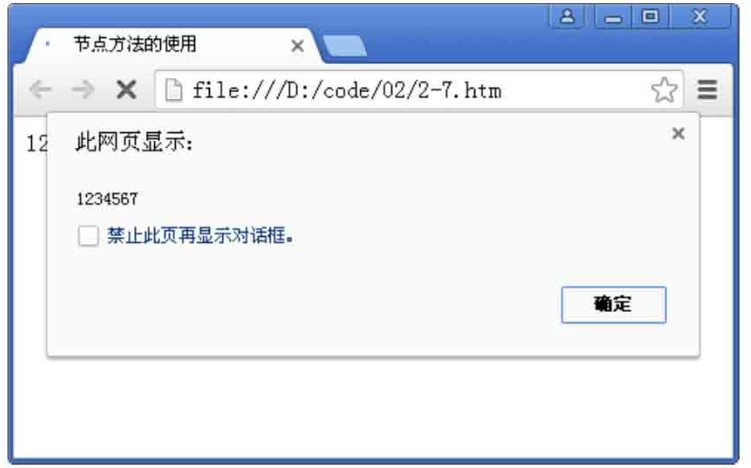
<p><strong>2.3.1 爬虫概述</strong></p><p>爬虫实际上就是采集网络上数据的一段程序。把这句话拆分一下,去掉其中的修饰词,就可以看到其实爬虫指的就是一段程序。这段程序的功能就是从网络上采集需要的数据。</p><p>一个爬虫的工作流程如下:</p><p>(1)发起请求。</p><p>(2)获取响应内容。</p><p>(3)解析内容。</p><p>(4)保存数据。</p><p>所以,爬虫就是从请求内容(即数据)到获取响应,接着解析内容,最后显示相应内容或者保持内容的过程。</p><p><strong>2.3.2 能抓取什么样的数据</strong></p><p>通过2.3.1小节的介绍,我们了解到爬虫的主要作用就是采集网络上的数据,那么究竟爬虫能抓取什么样的数据呢?从广义上来说,只要是能请求并且能获取响应的数据都能够被抓取,具体包括以下几类:</p><p>(1)网页文本,如HTML文档、JSON格式文本、XML格式文本等。</p><p>(2)图片文件,如JPEG、PNG等图片文件,获取的是二进制文件,保存为相应格式的图片即可。</p><p>(3)视频文件,如MP4、WMV等视频文件,同样获取的是二进制文件,保存为相应的视频格式即可。</p><p>(4)其他文件。只要是能请求到的文件都能获取,比如MP3文件、Flash文件以及其他各种类型的文件。</p><p><strong>2.3.3 JavaScript渲染页面</strong></p><p>在介绍JavaScript渲染页面之前,我们先来了解一下浏览器渲染页面的过程。HTML源代码由浏览器渲染为一个网页需要以下过程:<strong><br/></strong></p><p>(1)浏览器根据HTML结构生成DOM Tree(节点树)。</p><p>(2)浏览器根据CSS(Cascading Style Sheets,层叠样式表)生成CSSOM(样式表对象模型)。</p><p>(3)将DOM和CSSOM整合,形成RenderTree(渲染树)。</p><p>(4)浏览器根据渲染树开始渲染页面。</p><p>在这个过程中遇到&lt;script&gt;时会执行并阻塞渲染,因为JavaScript有权利改变DOM结构,甚至也能改变对象的CSS样式,所以要等JavaScript脚本执行完毕,之后再继续渲染过程。</p><p>通过以上内容可以了解到,JavaScript在整个页面渲染过程中起着举足轻重的作用,包括JavaScript在页面中的放置位置也十分重要。</p><p>如果JavaScript要对页面中的某个元素进行操作,就必须在这个元素加载之后才能进行,比如下面的代码。</p><p>【示例2-4】JavaScript渲染页面错误演示</p><pre class="brush:html;toolbar:false">&lt;!DOCTYPE&nbsp;html&gt; &lt;html&nbsp;lang=&quot;zh-CN&quot;&gt; &lt;head&gt; &lt;title&gt;节点方法的调用&lt;/title&gt; &lt;/head&gt; &lt;body&gt; &lt;script&gt; &nbsp;&nbsp;&nbsp;&nbsp;obj=document.getElementById(&quot;my_div&quot;) &nbsp;&nbsp;&nbsp;&nbsp;alert(obj.innerHTML) &lt;/script&gt; &lt;div&nbsp;id=&quot;my_div&quot;&gt;1234567&lt;/div&gt; &lt;/body&gt; &lt;/html&gt;</pre><p>以上代码尝试获取页面中层里的内容并以弹出窗口的形式显示其内容。将以上代码保存为2-6.htm,执行代码会发现,只会正常显示网页,但并没有任何弹出窗口。之所以会出现这种情况,就是因为&lt;script&gt;的出现中止了页面的渲染,导致获取不到&lt;script&gt;后面的层里的内容。</p><p>如果将代码修改如下:</p><pre class="brush:html;toolbar:false">&lt;div&nbsp;id=&quot;my_div&quot;&gt;1234567&lt;/div&gt; &lt;script&gt; &nbsp;&nbsp;obj=document.getElementById(&quot;my_div&quot;) &nbsp;&nbsp;alert(obj.innerHTML) &lt;/script&gt;</pre><p>也就是将&lt;script&gt;放到要操作层之后,修改后将代码保存为2-7.htm,再次执行代码就会看到弹出窗口的提示,执行结果如图2-10所示。</p><p><img src="/uploads/images/20231204/3d4a5a722fb5d992a7a04d4a7c263974.png" title="1.png" alt="" width="693" height="344"/></p><p><br/></p><p>学习更多专业Python知识,点此查看:</p><p style="text-wrap: wrap;"><a href="https://www.maxiaoke.com/manual/py_ssz.html" target="_self">《剑指Python-初级》</a>&nbsp; &nbsp; &nbsp;<a href="https://www.maxiaoke.com/manual/jz_pys_2.html" target="_self">《剑指Python-高级》</a></p><p><img src="/uploads/images/20231204/a64aeb23219a212638811c5bd0f355b0.png" title="py小册封面.png" alt=""/></p><p><br/></p><p><br/></p>

Python高并发与高性能系列-多线程与多进程

<p>1.4.1 多线程多线程一般指通过技术手段在具体项目中开启两个或两个以上线程,以一起执行任务。在Python中也是如此,我们可以通过Python提供的线程相关的类库在Python项目中开启多线程,比如使用Threading库等方式,这一点会在本书的高并发篇进行详细介绍。通过开启两个或两个以上线程,计算机可以异步或并发执行Python任务。通过该技术手段,Python任务得到充分执行,可以使CPU可以充分地发挥作用,不再因为等待任务的执行而延长CPU等待执行任务的时间。</p><p>1.4.2 多进程多进程一般指通过技术手段,将同一个项目拆分成不同的进程来一起运行项目的现象。这种技术目前只有一些理论内容,并没有实际的产出,因为这种理论在正常情况下实现起来还是有一定难度的,所以本书不做过多介绍。</p><p>1.4.3 单线程单线程指的是项目自始至终只有一个线程负责执行任务。这种单线程执行任务的方式在比较简单的场景中比较适用,但是,一旦项目具备一定的业务逻辑或者有计算要求,再采用单线程的方式去处理任务就不是很合适了。试想一下,一个线程正在执行一个比较耗时的计算任务,而后续代码需要这个计算任务的结果才能继续向下执行。此时,由于只有一个线程执行,所以不得不等待该线程执行完后才能继续执行后续的业务逻辑,这一等待过程会直接反映到用户层面,即用户在使用该项目时会感知到明显的等待时间,这会给用户带来不好的体验。</p><p>为了避免上述现象出现,我们不得不在项目中采用多线程的方式进行优化,但是,使用多线程来对项目进行优化就一定好吗?</p><p>1.4.4 多线程的优势与不足任何事物都具有两面性,多线程亦是如此。在通过多线程来优化项目时,我们不得不反思使用多线程会不会给项目增加其他的负担。答案是一定会。</p><p>对于CPython虚拟机来说,多线程是通过切换线程上下文而实现的。而每一次线程上下文切换,都会带来一定的时间开销,都需要CPython虚拟机去等待执行,这也是使用多线程处理任务必须要花费的时间成本。除了时间成本,在Python项目中将具体代码优化成线程安全的常用手段还是加锁,而一旦给代码解锁,就会带来线程间对于临界区资源的竞争,一旦存在资源的竞争,线程之间就会等待获取锁,从而获取线程所需的资源,这其中也需要一定的时间成本。如果开发者不懂如何给代码加锁,从而乱用各种锁,这对于代码本身就不是一件正常的事情,大概率也不会实现线程安全,只会让结果变得更糟。</p><p>综上所述,我们只有在具备一定的多线程应用能力之后,才能对Python代码进行优化,这样才能发挥多线程的优势。而实现多线程的每一种技术手段都需要读者潜心钻研、自我总结。</p><p><br/></p><p><span style="text-wrap: nowrap;">---------------------------------------------------------------------------------</span></p><p><span style="text-wrap: nowrap;">学习更多专业Python知识,点此查看:</span></p><p><a href="https://www.maxiaoke.com/manual/py_ssz.html" target="_self"><span style="text-wrap: nowrap;">《剑指Python-上》</span></a><span style="text-wrap: nowrap;">&nbsp;&nbsp;</span><a href="https://www.maxiaoke.com/manual/jz_pys_2.html" target="_self"><span style="text-wrap: nowrap;">《剑指Python-下》</span></a></p><p><img src="/uploads/images/20231204/a64aeb23219a212638811c5bd0f355b0.png" title="py小册封面.png" alt=""/></p><p><span style="text-wrap: nowrap;">---------------------------------------------------------------------------------</span></p><p><br/></p>

Python高并发与高性能系列-线程的7种状态

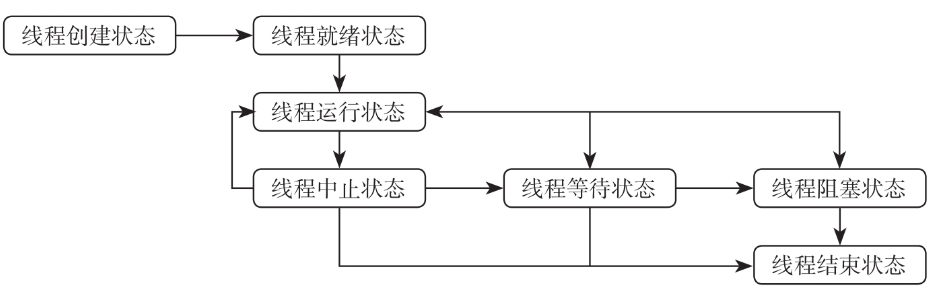
<p>任何一个具体的Python线程拥有7种不同的状态。这7种不同的状态构成了线程的生命周期。</p><p>● 线程创建状态:该状态表明线程刚刚被创建,还没有被调用或初始化,此时的线程只是一个空的线程对象。</p><p>● 线程就绪状态:在该状态下,初始化一些线程运行所需要的属性和方法,以便被任务调用。</p><p>● 线程运行状态:线程实际运行的状态,即线程一旦被任务调用,就会从线程就绪状态转变为线程运行状态,且线程一旦进入运行状态,就表明已经开始执行任务了。</p><p>● 线程中止状态:当线程在运行状态时,由于任务中止或者人为操作等迫使线程停止运行,线程从运行状态转变为中止状态。转变为中止状态的线程,如果没有人为干预,不会自动执行,除非给线程设定一定的饱和策略或其他可恢复线程执行的策略条件。</p><p>● 线程等待状态:线程等待状态分为无限期等待状态和限期等待状态。无限期等待表示CPU资源被先前的线程抢占,且先前的线程一直不释放CPU资源,导致当前线程无限期等待下去;限期等待表示先前已经抢占到CPU资源的线程,在过了一定时间后会自动释放CPU资源,当前线程只需要等待一定时间即可获取CPU资源。线程运行状态无论转变为无限期等待状态还是转变为限期等待状态,均需要开发者控制,线程无法自动转换。</p><p>● 线程阻塞状态:线程阻塞状态与线程等待状态类似,只不过线程阻塞状态更多地用于表示线程队列的状态,即在线程队列中,等待执行任务的线程均可以被认为是阻塞的。线程阻塞状态需要开发者控制,线程无法自动转换。</p><p>为了更清楚地说明线程状态,以及线程各状态间的转换,笔者画了一张线程状态转换图,如图1-7所示。</p><p><img src="/uploads/images/20231204/8d46b3c346776729b273b14de546e4e8.png" title="1.png" alt="" width="726" height="175"/></p><p>为了更清楚地说明线程状态,以及线程各状态间的转换,笔者画了一张线程状态转换图,如图1-7所示。</p><p style="text-wrap: wrap;"><span style="text-wrap: nowrap;">---------------------------------------------------------------------------------</span></p><p style="text-wrap: wrap;"><span style="text-wrap: nowrap;">学习更多专业Python知识,点此查看:</span></p><p style="text-wrap: wrap;"><a href="https://www.maxiaoke.com/manual/py_ssz.html" target="_self"><span style="text-wrap: nowrap;">《剑指Python-上》</span></a><span style="text-wrap: nowrap;">&nbsp;&nbsp;</span><a href="https://www.maxiaoke.com/manual/jz_pys_2.html" target="_self"><span style="text-wrap: nowrap;">《剑指Python-下》</span></a></p><p style="text-wrap: wrap;"><img src="https://www.maxiaoke.com/uploads/images/20231204/a64aeb23219a212638811c5bd0f355b0.png" title="py小册封面.png" alt=""/></p><p style="text-wrap: wrap;"><span style="text-wrap: nowrap;">---------------------------------------------------------------------------------</span></p><p><br/></p>

Python高并发与高性能系列-进程与线程

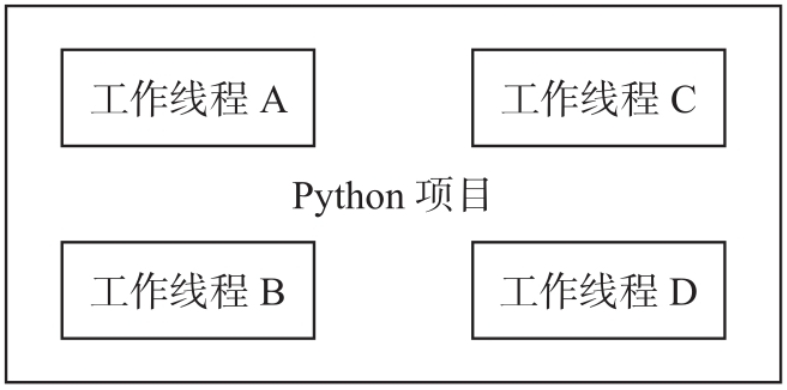
<p>在对Python类和对象有了一定了解之后,我们还需要了解进程与线程。对于进程与线程,这里不会局限于Python语言层面,而是从操作系统层面展开介绍。进程与线程是入门Python高并发编程必须掌握的基础知识。</p><p>进程(Process)是计算机中的基础运算单元,是CPU统筹计算机中所有任务的程序实体。CPU通过对不同进程进行调用,协调位于寄存器、运算器以及内存中计算机任务的时间片,使每个计算机任务都能得到合理执行和调用。</p><p>线程(Thread)是计算机任务的具体执行者,是操作系统能够进行运算、调度的最小单位。线程隶属于一个具体的进程。在同一时刻,一个进程可以拥有一个或多个线程,线程是开发者可以直接与计算机CPU或内存进行交互的最小单位。</p><p>在操作系统(泛指Windows系统或Linux系统)中,进程指的是CPU调度的程序实体,线程是具体程序实体的执行者。一个进程可以包含多个线程,但是一个线程只能从属于一个具体的进程。一个线程不能跨进程存在,但是一个进程中的线程可以通过技术手段访问或操作另一个进程中的线程。</p><p>下面通过画图的方式来阐述进程与线程在Python项目中的存在方式,如图1-6所示。</p><p><img src="/uploads/images/20231204/99d6ce1d8ce76d8394cfa4a827e69d69.png" title="1.png" alt=""/></p><p>一个具体的Python项目可以表示为一个进程,即Python项目启动之后,就会在计算机中以一个具体的进程存在,并且由计算机操作系统管理。当启动Python项目时,根据Python虚拟机(或解释器)解析Python语言的规范,Python虚拟机会创建一个专门用于解析Python语言的主线程,接着会创建一个专门用于执行Python语言所定义的任务的工作线程,即一旦Python项目正常运行起来,在计算机中就会存在一个Python主线程和至少一个工作线程。如果是多线程的业务场景,Python就会创建出多个工作线程来并发执行任务。</p><p style="text-wrap: wrap;"><span style="text-wrap: nowrap;">---------------------------------------------------------------------------------</span></p><p style="text-wrap: wrap;"><span style="text-wrap: nowrap;">学习更多专业Python知识,点此查看:</span></p><p style="text-wrap: wrap;"><a href="https://www.maxiaoke.com/manual/py_ssz.html" target="_self"><span style="text-wrap: nowrap;">《剑指Python-上》</span></a><span style="text-wrap: nowrap;">&nbsp;&nbsp;</span><a href="https://www.maxiaoke.com/manual/jz_pys_2.html" target="_self"><span style="text-wrap: nowrap;">《剑指Python-下》</span></a></p><p style="text-wrap: wrap;"><img src="https://www.maxiaoke.com/uploads/images/20231204/a64aeb23219a212638811c5bd0f355b0.png" title="py小册封面.png" alt=""/></p><p style="text-wrap: wrap;"><span style="text-wrap: nowrap;">---------------------------------------------------------------------------------</span></p><p><br/></p>

Python高并发与高性能系列-Python中的对象

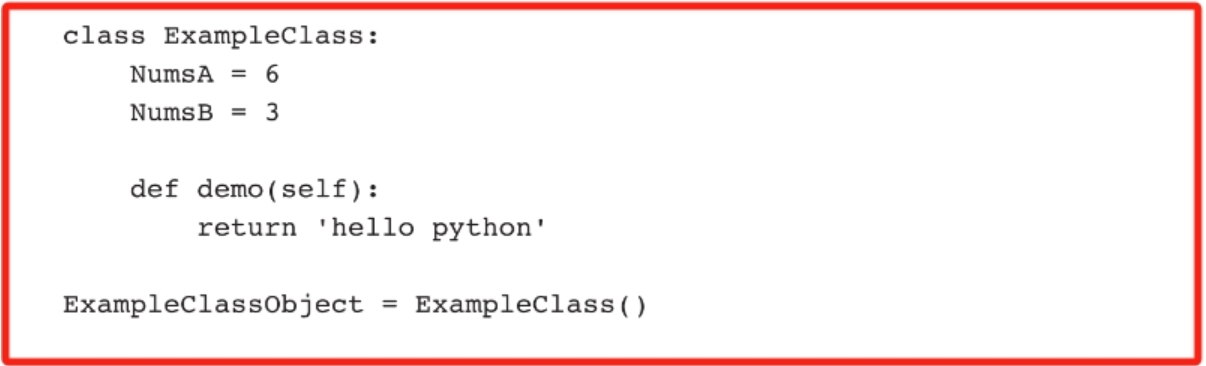
<p>本质上来说,Python中的对象是对Python中的类进行实例化后输出的产物。Python中的对象和Python中的基本类型变量在实现方式上是完全不同的。</p><p>对于Python中的基本类型变量来说,Python官方在Python语言层面已经进行了规定或约束。以数字类型变量来说,在Python语言对外发布时,数字类型已经被固化到了Python语言当中,并且通过一定的数字占位,与Python虚拟机中的语义规范进行对应,即我们在Python中声明了数字类型的基本变量之后,Python虚拟机通过已经固化好的数字占位来识别这一变量所属的类型。</p><p>Python中的对象本身也是一种变量,只不过这种变量的类型是随机的、可变的,这是与Python中的基本类型变量最大的不同之处。Python官方规定了Python对象在Python虚拟机中的存活方式,即以一种对象地址的形式在Python虚拟机中存在,且对象的生命周期交由Python虚拟机自动管理,不需要开发者手动管理Python对象的生命周期。需要开发者做的,只是创建Python对象。</p><p>在Python中,创建一个类的对象的代码如下所示。</p><p><img src="/uploads/images/20231204/a4ece6dd2042e832ef513c08ee384a58.png" title="1.png" alt=""/></p><p>在上述代码中,我们定义了一个名为ExampleClass的类,并且在ExampleClass类中声明了两个数字类型变量NumsA和NumsB,还声明了一个名为demo的方法,该方法最终返回hello python。我们将ExampleClass类定义完毕之后,就可以在需要用到的地方对它进行实例化了。在上述代码中,ExampleClassObject=ExampleClass()代码通过ExampleClass()的方式将定义好的ExampleClass类实例化,即通过ExampleClass()的方式创建ExampleClass类的对象,并用ExampleClassObject变量来接收。</p><p>和其他面向对象的编程语言创建类的对象的方式不同,在Python中不需要通过new关键字创建对象,只需要在类的名称后面添加一对英文状态下的小括号就可以了。其他面向对象的高级编程语言中的对象的基本组成,如对象的头信息、对象的实例数据、对象的填充数据,在Python语言中也有。</p><p>在执行了ExampleClass()之后,Python解释器会首先确定与ExampleClass()对应的类的类型。在确定对应类的类型后,Python解释器便和Python虚拟机共同为ExampleClass()类型对象分配一定的内存空间,从而存储ExampleClass()对象。在这些基础的分配流程完成之后,我们还为ExampleClass()对象赋予一个变量,即ExampleClassObject。所以,访问ExampleClass()对象中的字段或者方法可以通过ExampleClassObject变量来实现。值得注意的是,ExampleClassObject变量中并不会存储ExampleClass()对象本身,而是存储ExampleClass()对象的副本地址,使其成为ExampleClass()对象的一个引用,并最终以这种引用的方式存在。在Python中,通过ExampleClassObject变量来访问ExampleClass()对象时始终会使用引用的方式。</p><p style="text-wrap: wrap;"><span style="text-wrap: nowrap;">---------------------------------------------------------------------------------</span></p><p style="text-wrap: wrap;"><span style="text-wrap: nowrap;">学习更多专业Python知识,点此查看:</span></p><p style="text-wrap: wrap;"><a href="https://www.maxiaoke.com/manual/py_ssz.html" target="_self"><span style="text-wrap: nowrap;">《剑指Python-上》</span></a><span style="text-wrap: nowrap;">&nbsp;&nbsp;</span><a href="https://www.maxiaoke.com/manual/jz_pys_2.html" target="_self"><span style="text-wrap: nowrap;">《剑指Python-下》</span></a></p><p style="text-wrap: wrap;"><img src="https://www.maxiaoke.com/uploads/images/20231204/a64aeb23219a212638811c5bd0f355b0.png" title="py小册封面.png" alt=""/></p><p style="text-wrap: wrap;"><span style="text-wrap: nowrap;">---------------------------------------------------------------------------------</span></p><p><br/></p>

Python高并发与高性能系列-Python中的类

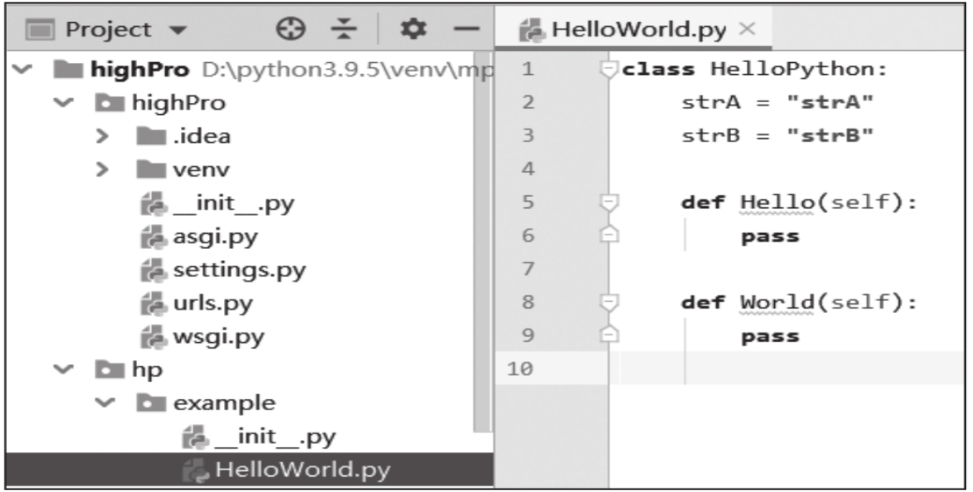
<p>Python作为一门面向对象的高级编程语言,提供了丰富的面向对象编程的实现,包括面向对象语言中的类、对象。对于任意一门面向对象的高级编程语言,最基础的特性都是封装、继承和多态,而实现这些特性的基础正是面向对象编程语言中的类。</p><p>类是真实世界中的事务在Python语言中的一种实现,其规定了真实世界中的事务在Python语言中的组成,是使用Python来描绘真实世界中事务的手段。在真实世界中,事务可能是一个非常大的问题,也可能是一个非常小的问题,即在真实世界中,事务本身不是一个定数,所以,Python中类的设计也是如此。</p><p>Python中的类规定了真实世界中的事务在Python中的定义和实现,我们可以通过以下代码定义Python中的类:[插图]执行上述代码即可创建一个名为[className]的Python类。在Python中存在一个全局解释器,该解释器用来执行Python代码。Python解释器将处理类的过程全部执行完毕后,通过上述代码创建的Python类才能被真正创建。</p><p>Python中的类在被创建之后,在类的同一生命周期下,就不允许继续修改了,因为该类已经被转义为Python解释器可识别的代码,这些代码已经被解释和执行了。如果需要继续修改该Python类,我们可以先在该Python类中编写需要修改的内容,然后手动执行并重新解释。</p><p>在了解了Python类的创建过程和解释过程之后,我们真正创建一个Python类来进一步了解Python类的组成。根据上述创建类的代码,我们创建一个名为HelloPython的类,并且在HelloPython类中先定义两个成员变量strA和strB,再定义两个方法:一个方法被声明为Hello,另一个方法被声明为World。</p><p>创建HelloPython类的代码如下所示。[插图]我们再来看一下HelloPython类所在的目录结构,以PyCharm代码编辑器为例,HelloPython所在目录结构如图1-1所示。</p><p><img src="/uploads/images/20231204/e260603f0b004cc82292ae19b0e1e0c7.png" title="1.png" alt="" width="652" height="335"/></p><p>这里是在一个名为highPro的项目中创建HelloPython类。highPro项目是本书所使用的项目,该项目会在后文进行介绍。通过图1-1可知,HelloPython类所在的Python文件名为HelloWorld,并不是HelloPython,这在Python语言中是允许的,但是在Java语言中会直接报错,连编译都不能。</p><p>这就是Python语言和Java语言最显著的区别。Python解释器在解释Python代码时,会先对Python代码进行编译,在编译通过之后,才会将编译的Python代码交给Python解释器(虚拟机)来执行,这是Python代码解释的全过程,而在这个过程中会有不同类型的文件产出。我们以HelloPython类为例展开介绍,如图1-2所示。</p><p><img src="/uploads/images/20231204/3ff8d3360cfd72acd303f1abda863a26.png" title="1.png" alt="" width="647" height="357"/></p><p>通过图1-2可知,HelloPython类会先被Python编译器进行编译。在编译阶段,Python编译器会检查HelloPython类代码是否符合Python语言所规定的语法格式和语义规范,还会检查各种变量的定义和引用等。只有这些检查项全部通过,编译才能通过,这些检查项中只要有一项存在异常或错误,Python编译器就会立即中断编译,向用户抛出异常或错误。重复该过程,直到编译通过。</p><p>在HelloPython类编译通过后会输出HelloPython类字节码文件,如图1-3所示。</p><p><img src="/uploads/images/20231204/08d129d88940dd8afe8349388e64094b.png" title="1.png" alt="" width="856" height="76"/></p><p>通过图1-3可知,HelloPython类生成的字节码文件名为HelloWorld.cpython-39.pyc,大小为1KB。HelloPython类字节码文件名称由4部分组成。</p><p>● HelloWorld:表示Python文件的名称,即HelloPython类所在的Python文件的名称。● cpython:表示HelloPython类被哪种虚拟机编译,本书使用的是Python默认实现的CPython虚拟机,所以这里是cpython。</p><p>● 39:表示当前Python版本在CPython虚拟机中对应的字节码版本号,该版本号默认由采用的Python版本的第一位大版本号和第二位小版本号组成,忽略其余位数的版本号。本书采用的Python版本是3.9.5,取前两位来表示这一字节码版本号,忽略后面的5,所以这里是39。</p><p>pyc:这是文件的后缀名,表示当前的文件类型是Python字节码文件,而不是Java字节码文件。Java字节码文件名以javac结尾。</p><p>接着将HelloPython类字节码文件交由CPython虚拟机处理。CPython虚拟机的主要工作是解析HelloPython类字节码文件,并根据该字节码文件中的内容为HelloPython类中的各种变量分配内存空间,为各种方法创建执行所需的栈帧空间。</p><p>如果该类中存在类的实例,CPython虚拟机会为该类的实例分配内存空间,并初始化该类的实例的其他属性。下面介绍HelloPython类字节码文件中的底层内容,以便更好地理解Python类字节码文件,如图1-4所示。</p><p><img src="/uploads/images/20231204/2bae53cef8ccf686e85fd671bc419235.png" title="1.png" alt="" width="735" height="418"/></p><p>这里我们只需要看3个部分。第一部分是图1-4所示的前8位,即610D0D0A。这部分是Python字节码的第一部分,即Python语言中的魔数。CPython虚拟机根据这8位内容判断当前需要处理的字节码文件是不是Python字节码文件。如果一个字节码文件的头内容中包含610D0D0A,就表示该字节码文件是Python字节码文件,此时CPython虚拟机才会继续向下解析该文件,否则会终止解析,并向用户抛出异常或错误。</p><p>CPython虚拟机所能识别的Python字节码的魔数,同样会随着Python版本而发生改变,并不是固定不变的。第二部分是图1-4所示的第8列到第B列的内容,即DA808C62。这8位表示Python字节码文件头的大小。我们可以使用数据解释器计算出该类字节码文件头的大小,如图1-5所示。</p><p>第三部分是Offset,即偏移量从00000000往下一直到该文件结束(不包含00000000)的内容,这部分就是HelloPython类中的字段、方法或者实例被编译成字节码之后的内容。</p><p><img src="/uploads/images/20231204/e4a6e3765de7177694ae1f8bc8432841.png" title="1.png" alt="" width="749" height="210"/></p><p>回到我们平常所说的Python代码解释过程,结合笔者对HelloPython类代码的解析过程可以得出,Python语言中所说的解释器其实就是Python编译器和Python虚拟机结合的产物,即Python代码的编译和Python虚拟机的处理是同一时机触发的,只不过这个过程没有对外暴露而已。</p><p style="text-wrap: wrap;"><span style="text-wrap: nowrap;">---------------------------------------------------------------------------------</span></p><p style="text-wrap: wrap;"><span style="text-wrap: nowrap;">学习更多专业Python知识,点此查看:</span></p><p style="text-wrap: wrap;"><a href="https://www.maxiaoke.com/manual/py_ssz.html" target="_self"><span style="text-wrap: nowrap;">《剑指Python-上》</span></a><span style="text-wrap: nowrap;">&nbsp;&nbsp;</span><a href="https://www.maxiaoke.com/manual/jz_pys_2.html" target="_self"><span style="text-wrap: nowrap;">《剑指Python-下》</span></a></p><p style="text-wrap: wrap;"><img src="https://www.maxiaoke.com/uploads/images/20231204/a64aeb23219a212638811c5bd0f355b0.png" title="py小册封面.png" alt=""/></p><p style="text-wrap: wrap;"><span style="text-wrap: nowrap;">---------------------------------------------------------------------------------</span></p><p><br/></p>

人人都会用的宝塔Linux面板之安装Redis服务

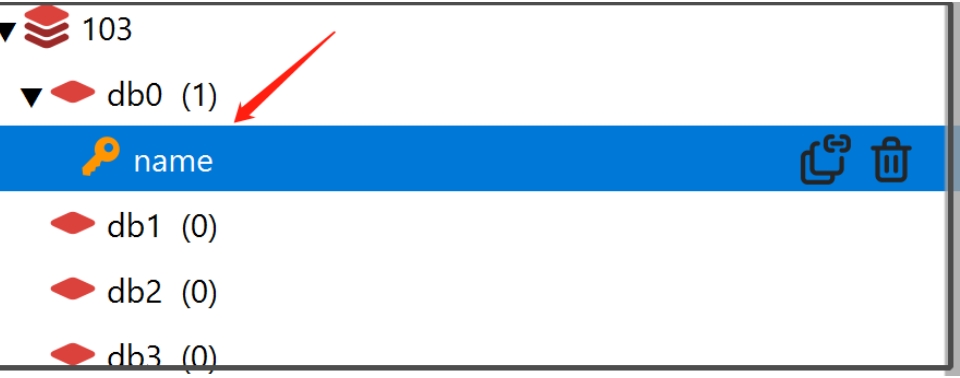
<p><span style="text-wrap: nowrap;">学习更多专业宝塔Linux知识,点此查看:<a href="https://www.maxiaoke.com/manual/bt_linux.html" target="_self"><span style="text-wrap: nowrap; color: rgb(79, 129, 189);"><strong>人人都会用的宝塔Linux面板</strong></span></a></span></p><p><span style="color: rgb(51, 51, 51); font-family: &quot;Microsoft YaHei&quot;, Helvetica, &quot;Meiryo UI&quot;, &quot;Malgun Gothic&quot;, &quot;Segoe UI&quot;, &quot;Trebuchet MS&quot;, Monaco, monospace, Tahoma, STXihei, 华文细黑, STHeiti, &quot;Helvetica Neue&quot;, &quot;Droid Sans&quot;, &quot;wenquanyi micro hei&quot;, FreeSans, Arimo, Arial, SimSun, 宋体, Heiti, 黑体, sans-serif; font-size: 14px;">找到菜单 [数据库] — Redis</span><br/></p><p style="box-sizing: border-box; margin-top: 0px; margin-bottom: 16px; color: rgb(51, 51, 51); font-family: &quot;Microsoft YaHei&quot;, Helvetica, &quot;Meiryo UI&quot;, &quot;Malgun Gothic&quot;, &quot;Segoe UI&quot;, &quot;Trebuchet MS&quot;, Monaco, monospace, Tahoma, STXihei, 华文细黑, STHeiti, &quot;Helvetica Neue&quot;, &quot;Droid Sans&quot;, &quot;wenquanyi micro hei&quot;, FreeSans, Arimo, Arial, SimSun, 宋体, Heiti, 黑体, sans-serif; font-size: 14px; text-wrap: wrap;">首次进来,提示我们未安装</p><p style="box-sizing: border-box; margin-top: 0px; margin-bottom: 16px; color: rgb(51, 51, 51); font-family: &quot;Microsoft YaHei&quot;, Helvetica, &quot;Meiryo UI&quot;, &quot;Malgun Gothic&quot;, &quot;Segoe UI&quot;, &quot;Trebuchet MS&quot;, Monaco, monospace, Tahoma, STXihei, 华文细黑, STHeiti, &quot;Helvetica Neue&quot;, &quot;Droid Sans&quot;, &quot;wenquanyi micro hei&quot;, FreeSans, Arimo, Arial, SimSun, 宋体, Heiti, 黑体, sans-serif; font-size: 14px; text-wrap: wrap;"><img src="https://www.maxiaoke.com/uploads/images/20230711/755d1922ab8f3514bf0ce0fc4f9378ef.png" alt="" width="660" height="255"/></p><p style="box-sizing: border-box; margin-top: 0px; margin-bottom: 16px; color: rgb(51, 51, 51); font-family: &quot;Microsoft YaHei&quot;, Helvetica, &quot;Meiryo UI&quot;, &quot;Malgun Gothic&quot;, &quot;Segoe UI&quot;, &quot;Trebuchet MS&quot;, Monaco, monospace, Tahoma, STXihei, 华文细黑, STHeiti, &quot;Helvetica Neue&quot;, &quot;Droid Sans&quot;, &quot;wenquanyi micro hei&quot;, FreeSans, Arimo, Arial, SimSun, 宋体, Heiti, 黑体, sans-serif; font-size: 14px; text-wrap: wrap;">点击安装。</p><p style="box-sizing: border-box; margin-top: 0px; margin-bottom: 16px; color: rgb(51, 51, 51); font-family: &quot;Microsoft YaHei&quot;, Helvetica, &quot;Meiryo UI&quot;, &quot;Malgun Gothic&quot;, &quot;Segoe UI&quot;, &quot;Trebuchet MS&quot;, Monaco, monospace, Tahoma, STXihei, 华文细黑, STHeiti, &quot;Helvetica Neue&quot;, &quot;Droid Sans&quot;, &quot;wenquanyi micro hei&quot;, FreeSans, Arimo, Arial, SimSun, 宋体, Heiti, 黑体, sans-serif; font-size: 14px; text-wrap: wrap;">通过下拉列表,可以选择要安装的Redis版本,这里我们以安装redis7.0.11版本为例。</p><p style="box-sizing: border-box; margin-top: 0px; margin-bottom: 16px; color: rgb(51, 51, 51); font-family: &quot;Microsoft YaHei&quot;, Helvetica, &quot;Meiryo UI&quot;, &quot;Malgun Gothic&quot;, &quot;Segoe UI&quot;, &quot;Trebuchet MS&quot;, Monaco, monospace, Tahoma, STXihei, 华文细黑, STHeiti, &quot;Helvetica Neue&quot;, &quot;Droid Sans&quot;, &quot;wenquanyi micro hei&quot;, FreeSans, Arimo, Arial, SimSun, 宋体, Heiti, 黑体, sans-serif; font-size: 14px; text-wrap: wrap;"><img src="https://www.maxiaoke.com/uploads/images/20230711/3ad72c5082298fdf78d8e4615e6060b3.png" alt=""/></p><h3 style="box-sizing: border-box; margin-top: 1.75em; margin-bottom: 16px; font-weight: 300; line-height: 1.43; font-size: 1.5em; font-family: Raleway, 微軟正黑體, &quot;Helvetica Neue&quot;, Helvetica, Arial, sans-serif; letter-spacing: 0.5px; position: relative; color: rgb(51, 51, 51); text-wrap: wrap;"><a class="reference-link" style="box-sizing: border-box; color: rgb(51, 202, 187); background-image: initial; background-position: initial; background-size: initial; background-repeat: initial; background-attachment: initial; background-origin: initial; background-clip: initial; transition: all 0.3s linear 0s; outline: none !important;"></a>使用客户端连接Redis</h3><p style="box-sizing: border-box; margin-top: 0px; margin-bottom: 16px; color: rgb(51, 51, 51); font-family: &quot;Microsoft YaHei&quot;, Helvetica, &quot;Meiryo UI&quot;, &quot;Malgun Gothic&quot;, &quot;Segoe UI&quot;, &quot;Trebuchet MS&quot;, Monaco, monospace, Tahoma, STXihei, 华文细黑, STHeiti, &quot;Helvetica Neue&quot;, &quot;Droid Sans&quot;, &quot;wenquanyi micro hei&quot;, FreeSans, Arimo, Arial, SimSun, 宋体, Heiti, 黑体, sans-serif; font-size: 14px; text-wrap: wrap;">找到菜单 [安全] 开放Redis 端口,6379:<br/><img src="https://www.maxiaoke.com/uploads/images/20230711/0e3fc495a53ffe1730cfea0652808080.png" alt="" width="668" height="617"/></p><p style="box-sizing: border-box; margin-top: 0px; margin-bottom: 16px; color: rgb(51, 51, 51); font-family: &quot;Microsoft YaHei&quot;, Helvetica, &quot;Meiryo UI&quot;, &quot;Malgun Gothic&quot;, &quot;Segoe UI&quot;, &quot;Trebuchet MS&quot;, Monaco, monospace, Tahoma, STXihei, 华文细黑, STHeiti, &quot;Helvetica Neue&quot;, &quot;Droid Sans&quot;, &quot;wenquanyi micro hei&quot;, FreeSans, Arimo, Arial, SimSun, 宋体, Heiti, 黑体, sans-serif; font-size: 14px; text-wrap: wrap;">找到菜单 [软件商店] 在应用搜索栏,搜索redis,找到我们安装的Redis,点击设置</p><ul style="box-sizing: border-box; margin-bottom: 16px; padding: 0px 0px 0px 2em; color: rgb(51, 51, 51); font-family: &quot;Microsoft YaHei&quot;, Helvetica, &quot;Meiryo UI&quot;, &quot;Malgun Gothic&quot;, &quot;Segoe UI&quot;, &quot;Trebuchet MS&quot;, Monaco, monospace, Tahoma, STXihei, 华文细黑, STHeiti, &quot;Helvetica Neue&quot;, &quot;Droid Sans&quot;, &quot;wenquanyi micro hei&quot;, FreeSans, Arimo, Arial, SimSun, 宋体, Heiti, 黑体, sans-serif; font-size: 14px; text-wrap: wrap;" class=" list-paddingleft-2"><li><p>修改bind ip:将127.0.0.1 改为0.0.0.0,允许任何ip访问。</p></li><li><p>添加redis访问密码:123456</p></li></ul><p style="box-sizing: border-box; margin-top: 0px; margin-bottom: 16px; color: rgb(51, 51, 51); font-family: &quot;Microsoft YaHei&quot;, Helvetica, &quot;Meiryo UI&quot;, &quot;Malgun Gothic&quot;, &quot;Segoe UI&quot;, &quot;Trebuchet MS&quot;, Monaco, monospace, Tahoma, STXihei, 华文细黑, STHeiti, &quot;Helvetica Neue&quot;, &quot;Droid Sans&quot;, &quot;wenquanyi micro hei&quot;, FreeSans, Arimo, Arial, SimSun, 宋体, Heiti, 黑体, sans-serif; font-size: 14px; text-wrap: wrap;"><img src="https://www.maxiaoke.com/uploads/images/20230711/18ab9b04f0a312ac3aa66b45ce1dc8cd.png" alt="" width="680" height="377"/></p><p style="box-sizing: border-box; margin-top: 0px; margin-bottom: 16px; color: rgb(51, 51, 51); font-family: &quot;Microsoft YaHei&quot;, Helvetica, &quot;Meiryo UI&quot;, &quot;Malgun Gothic&quot;, &quot;Segoe UI&quot;, &quot;Trebuchet MS&quot;, Monaco, monospace, Tahoma, STXihei, 华文细黑, STHeiti, &quot;Helvetica Neue&quot;, &quot;Droid Sans&quot;, &quot;wenquanyi micro hei&quot;, FreeSans, Arimo, Arial, SimSun, 宋体, Heiti, 黑体, sans-serif; font-size: 14px; text-wrap: wrap;">修改完配置后,切换到 [服务] 选项卡,重启一下Redis服务。</p><p style="box-sizing: border-box; margin-top: 0px; margin-bottom: 16px; color: rgb(51, 51, 51); font-family: &quot;Microsoft YaHei&quot;, Helvetica, &quot;Meiryo UI&quot;, &quot;Malgun Gothic&quot;, &quot;Segoe UI&quot;, &quot;Trebuchet MS&quot;, Monaco, monospace, Tahoma, STXihei, 华文细黑, STHeiti, &quot;Helvetica Neue&quot;, &quot;Droid Sans&quot;, &quot;wenquanyi micro hei&quot;, FreeSans, Arimo, Arial, SimSun, 宋体, Heiti, 黑体, sans-serif; font-size: 14px; text-wrap: wrap;"><img src="https://www.maxiaoke.com/uploads/images/20230711/aad18adc0c46aa87b0d6f4f1dd249c64.png" alt="" width="684" height="257"/></p><p style="box-sizing: border-box; margin-top: 0px; margin-bottom: 16px; color: rgb(51, 51, 51); font-family: &quot;Microsoft YaHei&quot;, Helvetica, &quot;Meiryo UI&quot;, &quot;Malgun Gothic&quot;, &quot;Segoe UI&quot;, &quot;Trebuchet MS&quot;, Monaco, monospace, Tahoma, STXihei, 华文细黑, STHeiti, &quot;Helvetica Neue&quot;, &quot;Droid Sans&quot;, &quot;wenquanyi micro hei&quot;, FreeSans, Arimo, Arial, SimSun, 宋体, Heiti, 黑体, sans-serif; font-size: 14px; text-wrap: wrap;">最后,我们使用Redis Desktop Manager连接服务器:<br/><img src="https://www.maxiaoke.com/uploads/images/20230711/1c6ead9e75dce1c6b3e889175ac732ae.png" alt="" width="681" height="425"/></p><h3 style="box-sizing: border-box; margin-top: 1.75em; margin-bottom: 16px; font-weight: 300; line-height: 1.43; font-size: 1.5em; font-family: Raleway, 微軟正黑體, &quot;Helvetica Neue&quot;, Helvetica, Arial, sans-serif; letter-spacing: 0.5px; position: relative; color: rgb(51, 51, 51); text-wrap: wrap;"><a class="reference-link" style="box-sizing: border-box; color: rgb(51, 202, 187); background-image: initial; background-position: initial; background-size: initial; background-repeat: initial; background-attachment: initial; background-origin: initial; background-clip: initial; transition: all 0.3s linear 0s; outline: none !important;"></a>添加key</h3><p style="box-sizing: border-box; margin-top: 0px; margin-bottom: 16px; color: rgb(51, 51, 51); font-family: &quot;Microsoft YaHei&quot;, Helvetica, &quot;Meiryo UI&quot;, &quot;Malgun Gothic&quot;, &quot;Segoe UI&quot;, &quot;Trebuchet MS&quot;, Monaco, monospace, Tahoma, STXihei, 华文细黑, STHeiti, &quot;Helvetica Neue&quot;, &quot;Droid Sans&quot;, &quot;wenquanyi micro hei&quot;, FreeSans, Arimo, Arial, SimSun, 宋体, Heiti, 黑体, sans-serif; font-size: 14px; text-wrap: wrap;">可以通过宝塔面板向reidis中添加一个key:</p><p style="box-sizing: border-box; margin-top: 0px; margin-bottom: 16px; color: rgb(51, 51, 51); font-family: &quot;Microsoft YaHei&quot;, Helvetica, &quot;Meiryo UI&quot;, &quot;Malgun Gothic&quot;, &quot;Segoe UI&quot;, &quot;Trebuchet MS&quot;, Monaco, monospace, Tahoma, STXihei, 华文细黑, STHeiti, &quot;Helvetica Neue&quot;, &quot;Droid Sans&quot;, &quot;wenquanyi micro hei&quot;, FreeSans, Arimo, Arial, SimSun, 宋体, Heiti, 黑体, sans-serif; font-size: 14px; text-wrap: wrap;"><img src="https://www.maxiaoke.com/uploads/images/20230711/b5e2cf165c65879fe7795674d2aaedf8.png" alt="" width="535" height="361"/></p><p style="box-sizing: border-box; margin-top: 0px; margin-bottom: 16px; color: rgb(51, 51, 51); font-family: &quot;Microsoft YaHei&quot;, Helvetica, &quot;Meiryo UI&quot;, &quot;Malgun Gothic&quot;, &quot;Segoe UI&quot;, &quot;Trebuchet MS&quot;, Monaco, monospace, Tahoma, STXihei, 华文细黑, STHeiti, &quot;Helvetica Neue&quot;, &quot;Droid Sans&quot;, &quot;wenquanyi micro hei&quot;, FreeSans, Arimo, Arial, SimSun, 宋体, Heiti, 黑体, sans-serif; font-size: 14px; text-wrap: wrap;"><img src="https://www.maxiaoke.com/uploads/images/20230711/262ceeca972c47dd76a5e023ad795f0f.png" alt="" width="782" height="296"/></p><p style="box-sizing: border-box; margin-top: 0px; margin-bottom: 16px; color: rgb(51, 51, 51); font-family: &quot;Microsoft YaHei&quot;, Helvetica, &quot;Meiryo UI&quot;, &quot;Malgun Gothic&quot;, &quot;Segoe UI&quot;, &quot;Trebuchet MS&quot;, Monaco, monospace, Tahoma, STXihei, 华文细黑, STHeiti, &quot;Helvetica Neue&quot;, &quot;Droid Sans&quot;, &quot;wenquanyi micro hei&quot;, FreeSans, Arimo, Arial, SimSun, 宋体, Heiti, 黑体, sans-serif; font-size: 14px; text-wrap: wrap;">通过redis客户端查看:<br/><img src="https://www.maxiaoke.com/uploads/images/20230711/a4d98aecd5bf19cd8121ec197cd45463.png" alt="" width="788" height="289"/></p><p style="box-sizing: border-box; margin-top: 0px; margin-bottom: 16px; color: rgb(51, 51, 51); font-family: &quot;Microsoft YaHei&quot;, Helvetica, &quot;Meiryo UI&quot;, &quot;Malgun Gothic&quot;, &quot;Segoe UI&quot;, &quot;Trebuchet MS&quot;, Monaco, monospace, Tahoma, STXihei, 华文细黑, STHeiti, &quot;Helvetica Neue&quot;, &quot;Droid Sans&quot;, &quot;wenquanyi micro hei&quot;, FreeSans, Arimo, Arial, SimSun, 宋体, Heiti, 黑体, sans-serif; font-size: 14px; text-wrap: wrap;">最后,我们可以通过服务器运行命令查看Redis服务的进程:</p><pre class="prettyprint linenums prettyprinted" style="box-sizing: border-box; font-variant-numeric: normal; font-variant-east-asian: normal; font-variant-alternates: normal; font-kerning: auto; font-optical-sizing: auto; font-feature-settings: normal; font-variation-settings: normal; font-variant-position: normal; font-stretch: normal; font-size: 11.9px; line-height: 1.6; font-family: &quot;YaHei Consolas Hybrid&quot;, Consolas, &quot;Meiryo UI&quot;, &quot;Malgun Gothic&quot;, &quot;Segoe UI&quot;, &quot;Trebuchet MS&quot;, Helvetica, monospace, monospace; margin-top: 0px; margin-bottom: 16px; overflow: auto; color: rgb(47, 111, 159); background-color: rgb(246, 246, 246); border: 1px solid rgb(238, 238, 238); padding: 10px; border-radius: 3px; overflow-wrap: break-word; text-wrap: wrap;">ps&nbsp;-ef&nbsp;|&nbsp;grep&nbsp;redis</pre><p style="box-sizing: border-box; margin-top: 0px; margin-bottom: 16px; color: rgb(51, 51, 51); font-family: &quot;Microsoft YaHei&quot;, Helvetica, &quot;Meiryo UI&quot;, &quot;Malgun Gothic&quot;, &quot;Segoe UI&quot;, &quot;Trebuchet MS&quot;, Monaco, monospace, Tahoma, STXihei, 华文细黑, STHeiti, &quot;Helvetica Neue&quot;, &quot;Droid Sans&quot;, &quot;wenquanyi micro hei&quot;, FreeSans, Arimo, Arial, SimSun, 宋体, Heiti, 黑体, sans-serif; font-size: 14px; text-wrap: wrap;"><img src="https://www.maxiaoke.com/uploads/images/20230711/d412276bfb7dfe79cff1559d1046625a.png" alt="" width="792" height="127"/></p><p style="box-sizing: border-box; margin-top: 0px; color: rgb(51, 51, 51); font-family: &quot;Microsoft YaHei&quot;, Helvetica, &quot;Meiryo UI&quot;, &quot;Malgun Gothic&quot;, &quot;Segoe UI&quot;, &quot;Trebuchet MS&quot;, Monaco, monospace, Tahoma, STXihei, 华文细黑, STHeiti, &quot;Helvetica Neue&quot;, &quot;Droid Sans&quot;, &quot;wenquanyi micro hei&quot;, FreeSans, Arimo, Arial, SimSun, 宋体, Heiti, 黑体, sans-serif; font-size: 14px; text-wrap: wrap; margin-bottom: 0px !important;">至此,我们的Redis服务就搭建完成。</p><p><br/></p>
人人都会用的宝塔Linux面板之创建PHP网站

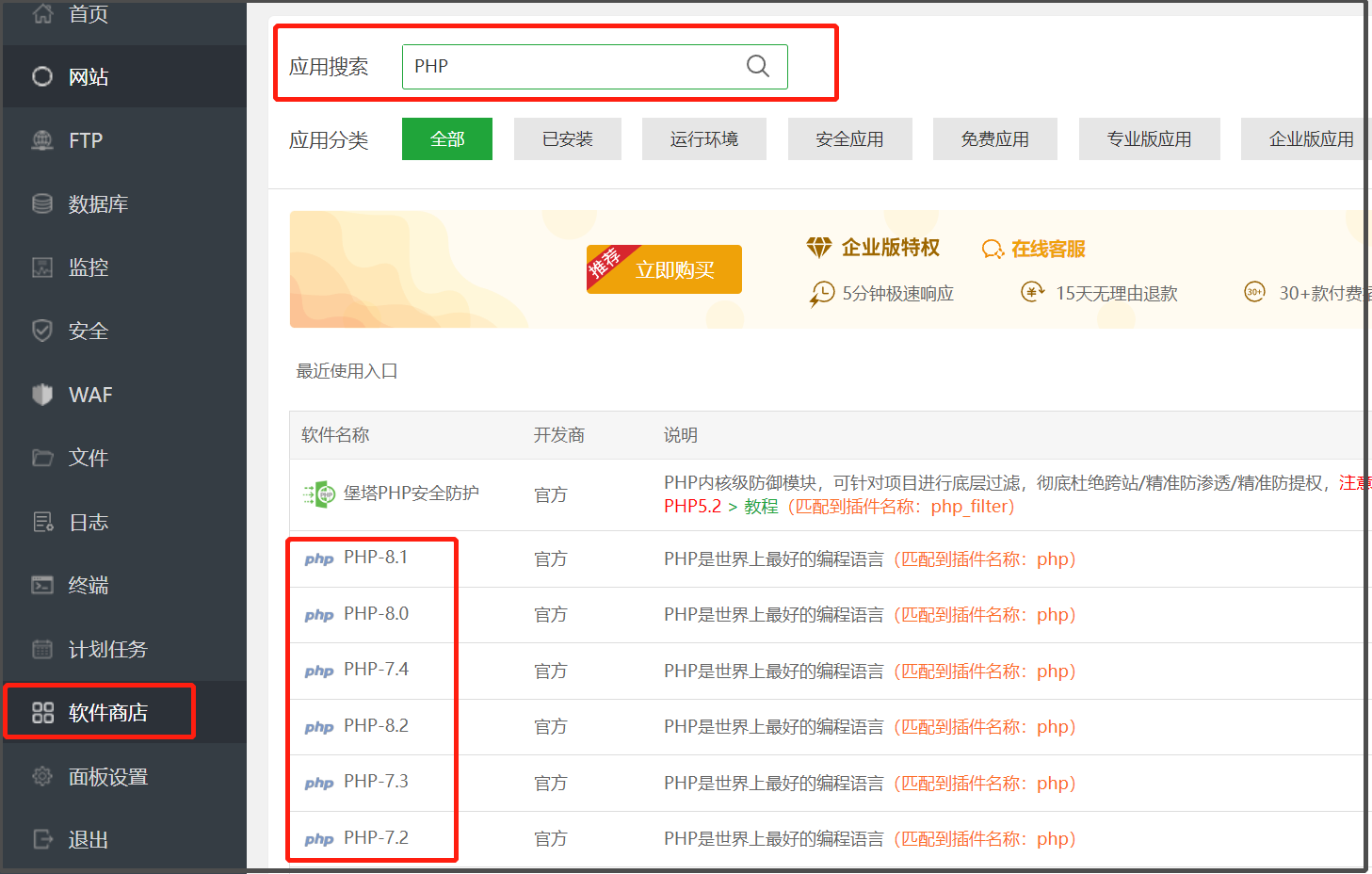
<p>学习更多专业宝塔Linux知识,点此查看:<a href="https://www.maxiaoke.com/manual/bt_linux.html" target="_self" style="color: rgb(79, 129, 189); text-decoration: underline;"><strong><span style="color: rgb(79, 129, 189);">人人都会用的宝塔Linux面板</span></strong></a></p><p>找到菜单栏的 [软件商店]<br/></p><p style="box-sizing: border-box; margin-top: 0px; margin-bottom: 16px; color: rgb(51, 51, 51); font-family: &quot;Microsoft YaHei&quot;, Helvetica, &quot;Meiryo UI&quot;, &quot;Malgun Gothic&quot;, &quot;Segoe UI&quot;, &quot;Trebuchet MS&quot;, Monaco, monospace, Tahoma, STXihei, 华文细黑, STHeiti, &quot;Helvetica Neue&quot;, &quot;Droid Sans&quot;, &quot;wenquanyi micro hei&quot;, FreeSans, Arimo, Arial, SimSun, 宋体, Heiti, 黑体, sans-serif; font-size: 14px; text-wrap: wrap;">在应用搜索处搜索:PHP<br/><img src="https://www.maxiaoke.com/uploads/images/20230711/26f1f616315a9beada9d8804fd94649e.png" alt="" width="769" height="703"/></p><p style="box-sizing: border-box; margin-top: 0px; margin-bottom: 16px; color: rgb(51, 51, 51); font-family: &quot;Microsoft YaHei&quot;, Helvetica, &quot;Meiryo UI&quot;, &quot;Malgun Gothic&quot;, &quot;Segoe UI&quot;, &quot;Trebuchet MS&quot;, Monaco, monospace, Tahoma, STXihei, 华文细黑, STHeiti, &quot;Helvetica Neue&quot;, &quot;Droid Sans&quot;, &quot;wenquanyi micro hei&quot;, FreeSans, Arimo, Arial, SimSun, 宋体, Heiti, 黑体, sans-serif; font-size: 14px; text-wrap: wrap;">可以看到各个PHP版本,这里我们选择一个PHP-7.4,点击右侧[安装]按钮,进行安装。</p><p style="box-sizing: border-box; margin-top: 0px; margin-bottom: 16px; color: rgb(51, 51, 51); font-family: &quot;Microsoft YaHei&quot;, Helvetica, &quot;Meiryo UI&quot;, &quot;Malgun Gothic&quot;, &quot;Segoe UI&quot;, &quot;Trebuchet MS&quot;, Monaco, monospace, Tahoma, STXihei, 华文细黑, STHeiti, &quot;Helvetica Neue&quot;, &quot;Droid Sans&quot;, &quot;wenquanyi micro hei&quot;, FreeSans, Arimo, Arial, SimSun, 宋体, Heiti, 黑体, sans-serif; font-size: 14px; text-wrap: wrap;">这里我们还是选择:[极速安装] 即可。</p><p style="box-sizing: border-box; margin-top: 0px; margin-bottom: 16px; color: rgb(51, 51, 51); font-family: &quot;Microsoft YaHei&quot;, Helvetica, &quot;Meiryo UI&quot;, &quot;Malgun Gothic&quot;, &quot;Segoe UI&quot;, &quot;Trebuchet MS&quot;, Monaco, monospace, Tahoma, STXihei, 华文细黑, STHeiti, &quot;Helvetica Neue&quot;, &quot;Droid Sans&quot;, &quot;wenquanyi micro hei&quot;, FreeSans, Arimo, Arial, SimSun, 宋体, Heiti, 黑体, sans-serif; font-size: 14px; text-wrap: wrap;"><img src="https://www.maxiaoke.com/uploads/images/20230711/c92e0073afe348f21b1c463c840b8069.png" alt="" width="763" height="343"/></p><p style="box-sizing: border-box; margin-top: 0px; margin-bottom: 16px; color: rgb(51, 51, 51); font-family: &quot;Microsoft YaHei&quot;, Helvetica, &quot;Meiryo UI&quot;, &quot;Malgun Gothic&quot;, &quot;Segoe UI&quot;, &quot;Trebuchet MS&quot;, Monaco, monospace, Tahoma, STXihei, 华文细黑, STHeiti, &quot;Helvetica Neue&quot;, &quot;Droid Sans&quot;, &quot;wenquanyi micro hei&quot;, FreeSans, Arimo, Arial, SimSun, 宋体, Heiti, 黑体, sans-serif; font-size: 14px; text-wrap: wrap;">安装完成后,查看消息列表:<br/><img src="https://www.maxiaoke.com/uploads/images/20230711/38565bee4703e39ca40da7e2c7e0f3b9.png" alt="" width="764" height="330"/></p><p style="box-sizing: border-box; margin-top: 0px; margin-bottom: 16px; color: rgb(51, 51, 51); font-family: &quot;Microsoft YaHei&quot;, Helvetica, &quot;Meiryo UI&quot;, &quot;Malgun Gothic&quot;, &quot;Segoe UI&quot;, &quot;Trebuchet MS&quot;, Monaco, monospace, Tahoma, STXihei, 华文细黑, STHeiti, &quot;Helvetica Neue&quot;, &quot;Droid Sans&quot;, &quot;wenquanyi micro hei&quot;, FreeSans, Arimo, Arial, SimSun, 宋体, Heiti, 黑体, sans-serif; font-size: 14px; text-wrap: wrap;">登录到服务器,查看php版本:</p><pre class="prettyprint linenums prettyprinted" style="box-sizing: border-box; font-variant-numeric: normal; font-variant-east-asian: normal; font-variant-alternates: normal; font-kerning: auto; font-optical-sizing: auto; font-feature-settings: normal; font-variation-settings: normal; font-variant-position: normal; font-stretch: normal; font-size: 11.9px; line-height: 1.6; font-family: &quot;YaHei Consolas Hybrid&quot;, Consolas, &quot;Meiryo UI&quot;, &quot;Malgun Gothic&quot;, &quot;Segoe UI&quot;, &quot;Trebuchet MS&quot;, Helvetica, monospace, monospace; margin-top: 0px; margin-bottom: 16px; overflow: auto; color: rgb(47, 111, 159); background-color: rgb(246, 246, 246); border: 1px solid rgb(238, 238, 238); padding: 10px; border-radius: 3px; overflow-wrap: break-word; text-wrap: wrap;">u3@k8s-node2:~/softs/btlinux$&nbsp;php&nbsp;-vPHP&nbsp;7.4.33&nbsp;(cli)&nbsp;(built:&nbsp;Jul&nbsp;11&nbsp;2023&nbsp;16:07:22)&nbsp;(&nbsp;NTS&nbsp;)Copyright&nbsp;(c)&nbsp;The&nbsp;PHP&nbsp;GroupZend&nbsp;Engine&nbsp;v3.4.0,&nbsp;Copyright&nbsp;(c)&nbsp;Zend&nbsp;Technologies</pre><p style="box-sizing: border-box; margin-top: 0px; margin-bottom: 16px; color: rgb(51, 51, 51); font-family: &quot;Microsoft YaHei&quot;, Helvetica, &quot;Meiryo UI&quot;, &quot;Malgun Gothic&quot;, &quot;Segoe UI&quot;, &quot;Trebuchet MS&quot;, Monaco, monospace, Tahoma, STXihei, 华文细黑, STHeiti, &quot;Helvetica Neue&quot;, &quot;Droid Sans&quot;, &quot;wenquanyi micro hei&quot;, FreeSans, Arimo, Arial, SimSun, 宋体, Heiti, 黑体, sans-serif; font-size: 14px; text-wrap: wrap;">到这里我们的PHP就安装完成了。</p><h3 style="box-sizing: border-box; margin-top: 1.75em; margin-bottom: 16px; font-weight: 300; line-height: 1.43; font-size: 1.5em; font-family: Raleway, 微軟正黑體, &quot;Helvetica Neue&quot;, Helvetica, Arial, sans-serif; letter-spacing: 0.5px; position: relative; color: rgb(51, 51, 51); text-wrap: wrap;"><a class="reference-link" style="box-sizing: border-box; color: rgb(51, 202, 187); background-image: initial; background-position: initial; background-size: initial; background-repeat: initial; background-attachment: initial; background-origin: initial; background-clip: initial; transition: all 0.3s linear 0s; outline: none !important;"></a>创建PHP网站</h3><p style="box-sizing: border-box; margin-top: 0px; margin-bottom: 16px; color: rgb(51, 51, 51); font-family: &quot;Microsoft YaHei&quot;, Helvetica, &quot;Meiryo UI&quot;, &quot;Malgun Gothic&quot;, &quot;Segoe UI&quot;, &quot;Trebuchet MS&quot;, Monaco, monospace, Tahoma, STXihei, 华文细黑, STHeiti, &quot;Helvetica Neue&quot;, &quot;Droid Sans&quot;, &quot;wenquanyi micro hei&quot;, FreeSans, Arimo, Arial, SimSun, 宋体, Heiti, 黑体, sans-serif; font-size: 14px; text-wrap: wrap;">接下来我们就可以创建一个支持PHP的网站了。</p><p style="box-sizing: border-box; margin-top: 0px; margin-bottom: 16px; color: rgb(51, 51, 51); font-family: &quot;Microsoft YaHei&quot;, Helvetica, &quot;Meiryo UI&quot;, &quot;Malgun Gothic&quot;, &quot;Segoe UI&quot;, &quot;Trebuchet MS&quot;, Monaco, monospace, Tahoma, STXihei, 华文细黑, STHeiti, &quot;Helvetica Neue&quot;, &quot;Droid Sans&quot;, &quot;wenquanyi micro hei&quot;, FreeSans, Arimo, Arial, SimSun, 宋体, Heiti, 黑体, sans-serif; font-size: 14px; text-wrap: wrap;"><img src="https://www.maxiaoke.com/uploads/images/20230711/364b547813b7eb1449ed64e75bde9160.png" alt="" width="770" height="667"/></p><blockquote style="box-sizing: border-box; margin: 0px 0px 16px; border-left: 4px solid rgb(238, 238, 238); font-size: 14px; padding: 0px 15px 0px 20px; color: rgb(102, 102, 102); font-style: italic; font-family: &quot;Microsoft YaHei&quot;, Helvetica, &quot;Meiryo UI&quot;, &quot;Malgun Gothic&quot;, &quot;Segoe UI&quot;, &quot;Trebuchet MS&quot;, Monaco, monospace, Tahoma, STXihei, 华文细黑, STHeiti, &quot;Helvetica Neue&quot;, &quot;Droid Sans&quot;, &quot;wenquanyi micro hei&quot;, FreeSans, Arimo, Arial, SimSun, 宋体, Heiti, 黑体, sans-serif; text-wrap: wrap;"><p style="box-sizing: border-box; margin-top: 0px; margin-bottom: 0px;">注意:<br/>因为我们使用虚拟机+ip方式添加的站点,没有域名。这个时候我们再添加一个网站会提示我们:您添加的站点已存在。<br/>如果是真实环境,我们这里指定不同网站的域名,就可以添加多个网站了。</p></blockquote><p style="box-sizing: border-box; margin-top: 0px; margin-bottom: 16px; color: rgb(51, 51, 51); font-family: &quot;Microsoft YaHei&quot;, Helvetica, &quot;Meiryo UI&quot;, &quot;Malgun Gothic&quot;, &quot;Segoe UI&quot;, &quot;Trebuchet MS&quot;, Monaco, monospace, Tahoma, STXihei, 华文细黑, STHeiti, &quot;Helvetica Neue&quot;, &quot;Droid Sans&quot;, &quot;wenquanyi micro hei&quot;, FreeSans, Arimo, Arial, SimSun, 宋体, Heiti, 黑体, sans-serif; font-size: 14px; text-wrap: wrap;">提交后,查看网站列表,我们的php网站就创建好了。</p><h3 style="box-sizing: border-box; margin-top: 1.75em; margin-bottom: 16px; font-weight: 300; line-height: 1.43; font-size: 1.5em; font-family: Raleway, 微軟正黑體, &quot;Helvetica Neue&quot;, Helvetica, Arial, sans-serif; letter-spacing: 0.5px; position: relative; color: rgb(51, 51, 51); text-wrap: wrap;"><a class="reference-link" style="box-sizing: border-box; color: rgb(51, 202, 187); background-image: initial; background-position: initial; background-size: initial; background-repeat: initial; background-attachment: initial; background-origin: initial; background-clip: initial; transition: all 0.3s linear 0s; outline: none !important;"></a>测试</h3><p style="box-sizing: border-box; margin-top: 0px; margin-bottom: 16px; color: rgb(51, 51, 51); font-family: &quot;Microsoft YaHei&quot;, Helvetica, &quot;Meiryo UI&quot;, &quot;Malgun Gothic&quot;, &quot;Segoe UI&quot;, &quot;Trebuchet MS&quot;, Monaco, monospace, Tahoma, STXihei, 华文细黑, STHeiti, &quot;Helvetica Neue&quot;, &quot;Droid Sans&quot;, &quot;wenquanyi micro hei&quot;, FreeSans, Arimo, Arial, SimSun, 宋体, Heiti, 黑体, sans-serif; font-size: 14px; text-wrap: wrap;">访问url:<br/><a href="http://192.168.31.103:8082/" style="box-sizing: border-box; color: rgb(51, 202, 187); text-decoration-line: none; background-image: initial; background-position: initial; background-size: initial; background-repeat: initial; background-attachment: initial; background-origin: initial; background-clip: initial; transition: all 0.3s linear 0s; outline: none !important;">http://192.168.31.103:8082/</a></p><p style="box-sizing: border-box; margin-top: 0px; margin-bottom: 16px; color: rgb(51, 51, 51); font-family: &quot;Microsoft YaHei&quot;, Helvetica, &quot;Meiryo UI&quot;, &quot;Malgun Gothic&quot;, &quot;Segoe UI&quot;, &quot;Trebuchet MS&quot;, Monaco, monospace, Tahoma, STXihei, 华文细黑, STHeiti, &quot;Helvetica Neue&quot;, &quot;Droid Sans&quot;, &quot;wenquanyi micro hei&quot;, FreeSans, Arimo, Arial, SimSun, 宋体, Heiti, 黑体, sans-serif; font-size: 14px; text-wrap: wrap;"><img src="https://www.maxiaoke.com/uploads/images/20230711/9f7566584ea5ce3cba57e82bc3870730.png" alt="" width="677" height="290"/></p><p style="box-sizing: border-box; margin-top: 0px; margin-bottom: 16px; color: rgb(51, 51, 51); font-family: &quot;Microsoft YaHei&quot;, Helvetica, &quot;Meiryo UI&quot;, &quot;Malgun Gothic&quot;, &quot;Segoe UI&quot;, &quot;Trebuchet MS&quot;, Monaco, monospace, Tahoma, STXihei, 华文细黑, STHeiti, &quot;Helvetica Neue&quot;, &quot;Droid Sans&quot;, &quot;wenquanyi micro hei&quot;, FreeSans, Arimo, Arial, SimSun, 宋体, Heiti, 黑体, sans-serif; font-size: 14px; text-wrap: wrap;">我们又看到了这个页面,由宝塔为我们创建的index.html</p><p style="box-sizing: border-box; margin-top: 0px; margin-bottom: 16px; color: rgb(51, 51, 51); font-family: &quot;Microsoft YaHei&quot;, Helvetica, &quot;Meiryo UI&quot;, &quot;Malgun Gothic&quot;, &quot;Segoe UI&quot;, &quot;Trebuchet MS&quot;, Monaco, monospace, Tahoma, STXihei, 华文细黑, STHeiti, &quot;Helvetica Neue&quot;, &quot;Droid Sans&quot;, &quot;wenquanyi micro hei&quot;, FreeSans, Arimo, Arial, SimSun, 宋体, Heiti, 黑体, sans-serif; font-size: 14px; text-wrap: wrap;">在服务器上创建一个index.php文件,j在该文件里打印phpinfo信息。</p><pre class="prettyprint linenums prettyprinted" style="box-sizing: border-box; font-variant-numeric: normal; font-variant-east-asian: normal; font-variant-alternates: normal; font-kerning: auto; font-optical-sizing: auto; font-feature-settings: normal; font-variation-settings: normal; font-variant-position: normal; font-stretch: normal; font-size: 11.9px; line-height: 1.6; font-family: &quot;YaHei Consolas Hybrid&quot;, Consolas, &quot;Meiryo UI&quot;, &quot;Malgun Gothic&quot;, &quot;Segoe UI&quot;, &quot;Trebuchet MS&quot;, Helvetica, monospace, monospace; margin-top: 0px; margin-bottom: 16px; overflow: auto; color: rgb(47, 111, 159); background-color: rgb(246, 246, 246); border: 1px solid rgb(238, 238, 238); padding: 10px; border-radius: 3px; overflow-wrap: break-word; text-wrap: wrap;">u3@k8s-node2:/www/wwwroot/test-php$&nbsp;sudo&nbsp;vim&nbsp;index.phpu3@k8s-node2:/www/wwwroot/test-php$&nbsp;ls404.html&nbsp;&nbsp;index.html&nbsp;&nbsp;index.php&nbsp;&nbsp;&nbsp;&nbsp;&nbsp;u3@k8s-node2:/www/wwwroot/test-php$&nbsp;cat&nbsp;index.php&lt;?phpphpinfo();</pre><p style="box-sizing: border-box; margin-top: 0px; margin-bottom: 16px; color: rgb(51, 51, 51); font-family: &quot;Microsoft YaHei&quot;, Helvetica, &quot;Meiryo UI&quot;, &quot;Malgun Gothic&quot;, &quot;Segoe UI&quot;, &quot;Trebuchet MS&quot;, Monaco, monospace, Tahoma, STXihei, 华文细黑, STHeiti, &quot;Helvetica Neue&quot;, &quot;Droid Sans&quot;, &quot;wenquanyi micro hei&quot;, FreeSans, Arimo, Arial, SimSun, 宋体, Heiti, 黑体, sans-serif; font-size: 14px; text-wrap: wrap;">刷新页面查看:<br/><img src="https://www.maxiaoke.com/uploads/images/20230711/eea4802f851c2e60ee07763929c6f6f7.png" alt="" width="707" height="431"/></p><p style="box-sizing: border-box; margin-top: 0px; margin-bottom: 16px; color: rgb(51, 51, 51); font-family: &quot;Microsoft YaHei&quot;, Helvetica, &quot;Meiryo UI&quot;, &quot;Malgun Gothic&quot;, &quot;Segoe UI&quot;, &quot;Trebuchet MS&quot;, Monaco, monospace, Tahoma, STXihei, 华文细黑, STHeiti, &quot;Helvetica Neue&quot;, &quot;Droid Sans&quot;, &quot;wenquanyi micro hei&quot;, FreeSans, Arimo, Arial, SimSun, 宋体, Heiti, 黑体, sans-serif; font-size: 14px; text-wrap: wrap;">现在我们的网站就支持PHP的项目了。</p><p style="box-sizing: border-box; margin-top: 0px; color: rgb(51, 51, 51); font-family: &quot;Microsoft YaHei&quot;, Helvetica, &quot;Meiryo UI&quot;, &quot;Malgun Gothic&quot;, &quot;Segoe UI&quot;, &quot;Trebuchet MS&quot;, Monaco, monospace, Tahoma, STXihei, 华文细黑, STHeiti, &quot;Helvetica Neue&quot;, &quot;Droid Sans&quot;, &quot;wenquanyi micro hei&quot;, FreeSans, Arimo, Arial, SimSun, 宋体, Heiti, 黑体, sans-serif; font-size: 14px; text-wrap: wrap; margin-bottom: 0px !important;">至此,创建一个PHP的网站就完成了。</p><p><br/></p>