系统学习magento二次开发,推荐小册:《Magento中文全栈二次开发 》

本小册面向Magento2以上版本,书代码及示例兼容magento2.0-2.4版本。涵盖了magento前端开发,后端开发,magento2主题,magento2重写,magento2 layout,magento2控制器,magento2 block等相关内容,带领您成为magento开发技术专家。
今天我们将学习如何在Magento 2中的类别分层导航中添加库存过滤器。
为客户提供无缝高效的购物体验至关重要。实现这一目标的一种方法是启用有用的过滤器,帮助客户缩小产品搜索范围。
在Magento 2中的类别分层导航中添加库存过滤器可以通过允许客户根据产品的可用性过滤产品来大大增强用户体验。提供此类过滤选项有助于在您的Magento 2电子商务平台上提供更简化和客户友好的购物体验。
在本教程中,我们将指导您完成将库存筛选器添加到Magento 2商店中的类别分层导航的过程。
在Magento 2中的类别分层导航中添加库存过滤器的步骤:
步骤1: 首先,我们需要在扩展名内部的以下路径创建一个“di.xml”文件。
app\code\Vendor\Extension\etc\frontend
然后添加代码,如下所示
<?xml version="1.0"?>
<config xmlns:xsi="http://www.w3.org/2001/XMLSchema-instance" xsi:noNamespaceSchemaLocation="../../../../../../lib/internal/Magento/Framework/ObjectManager/etc/config.xsd">
    <type name="Magento\Catalog\Model\Layer\FilterList">
        <plugin name="stock-filter-category-navigation" type="Vendor\Extension\Model\Plugin\FilterList" sortOrder="100" />
    </type>
</config>
第2步: 之后,我们需要在扩展名中以以下路径创建一个“Stock.php”文件。
app\code\Vendor\Extension\Model\Layer\Filter
现在添加代码,如下所述
<?php
namespace Vendor\Extension\Model\Layer\Filter;

class Stock extends \Magento\Catalog\Model\Layer\Filter\AbstractFilter
{
    const IN_STOCK_COLLECTION_FLAG = 'stock_filter_applied';

    protected $_activeFilter = false;
    protected $_requestVar = 'in-stock';
    protected $_scopeConfig;

    public function __construct(
        \Magento\Framework\App\Config\ScopeConfigInterface $scopeConfig,
        \Magento\Catalog\Model\Layer\Filter\ItemFactory $filterItemFactory,
        \Magento\Store\Model\StoreManagerInterface $storeManager,
        \Magento\Catalog\Model\Layer $layer,
        \Magento\Catalog\Model\Layer\Filter\Item\DataBuilder $itemDataBuilder,
        array $data = []
    ) {
        $this->_scopeConfig = $scopeConfig;
        parent::__construct($filterItemFactory, $storeManager, $layer, $itemDataBuilder, $data);
    }

    public function apply(\Magento\Framework\App\RequestInterface $request)
    {
        $filter = $request->getParam($this->getRequestVar(), null);
        if (is_null($filter)) {
            return $this;
        }
        $this->_activeFilter = true;
        $filter = (int)(bool)$filter;
        $collection = $this->getLayer()->getProductCollection();
        $collection->setFlag(self::IN_STOCK_COLLECTION_FLAG, true);
        $collection->getSelect()->where('stock_status_index.stock_status = ?', $filter);
        $this->getLayer()->getState()->addFilter(
            $this->_createItem($this->getLabel($filter), $filter)
        );
        return $this;
    }

    public function getName()
    {
        return __("Stock");
    }

    protected function _getItemsData()
    {
        if ($this->getLayer()->getProductCollection()->getFlag(self::IN_STOCK_COLLECTION_FLAG)) {
            return [];
        }

        $data = [];
        foreach ($this->getStatuses() as $status) {
            $data[] = [
                'label' => $this->getLabel($status),
                'value' => $status,
                'count' => $this->getProductsCount($status)
            ];
        }

        return $data;
    }

    public function getStatuses()
    {
        return [
            \Magento\CatalogInventory\Model\Stock::STOCK_IN_STOCK,
            \Magento\CatalogInventory\Model\Stock::STOCK_OUT_OF_STOCK
        ];
    }

    public function getLabels()
    {
        return [
            \Magento\CatalogInventory\Model\Stock::STOCK_IN_STOCK => __('In Stock'),
            \Magento\CatalogInventory\Model\Stock::STOCK_OUT_OF_STOCK => __('Out of stock'),
        ];
    }

    public function getLabel($value)
    {
        $labels = $this->getLabels();
        if (isset($labels[$value])) {
            return $labels[$value];
        }
        return '';
    }

    public function getProductsCount($value)
    {
        $collection = $this->getLayer()->getProductCollection();
        $select = clone $collection->getSelect();
        // reset columns, order and limitation conditions
        $select->reset(\Zend_Db_Select::COLUMNS);
        $select->reset(\Zend_Db_Select::ORDER);
        $select->reset(\Zend_Db_Select::LIMIT_COUNT);
        $select->reset(\Zend_Db_Select::LIMIT_OFFSET);
        $select->where('stock_status_index.stock_status = ?', $value);
        $select->columns(
            [
                'count' => new \Zend_Db_Expr("COUNT(e.entity_id)")
            ]
        );
        return $collection->getConnection()->fetchOne($select);
    }
}
第三步: 之后,我们需要在扩展名中的以下路径中创建“FilterList.php”文件。
app\code\Vendor\Extension\Model\Plugin
最后,添加代码如下
<?php
namespace Vendor\Extension\Model\Plugin;

class FilterList
{
    const STOCK_FILTER_CLASS  = 'Vendor\Extension\Model\Layer\Filter\Stock';

    protected $_objectManager;
    protected $_layer;
    protected $_storeManager;
    protected $_stockResource;
    protected $_scopeConfig;

    public function __construct(
        \Magento\Store\Model\StoreManagerInterface $storeManager,
        \Magento\Framework\ObjectManagerInterface $objectManager,
        \Magento\CatalogInventory\Model\ResourceModel\Stock\Status $stockResource,
        \Magento\Framework\App\Config\ScopeConfigInterface $scopeConfig
    ) {
        $this->_storeManager = $storeManager;
        $this->_objectManager = $objectManager;
        $this->_stockResource = $stockResource;
        $this->_scopeConfig = $scopeConfig;
    }

    public function isEnabled()
    {
        $outOfStockEnabled = $this->_scopeConfig->isSetFlag(
            \Magento\CatalogInventory\Model\Configuration::XML_PATH_DISPLAY_PRODUCT_STOCK_STATUS,
            \Magento\Store\Model\ScopeInterface::SCOPE_STORE
        );
        return $outOfStockEnabled;
    }

    public function beforeGetFilters(
        \Magento\Catalog\Model\Layer\FilterList\Interceptor $filterList,
        \Magento\Catalog\Model\Layer $layer
    ) {
        $this->_layer = $layer;
        if ($this->isEnabled()) {
            $collection = $layer->getProductCollection();
            $websiteId = $this->_storeManager->getStore($collection->getStoreId())->getWebsiteId();
            $this->_addStockStatusToSelect($collection->getSelect(), $websiteId);
        }
        return array($layer);
    }

    public function afterGetFilters(
        \Magento\Catalog\Model\Layer\FilterList\Interceptor $filterList,
        array $filters
    ) {
        if ($this->isEnabled()) {
            $filters[] = $this->getStockFilter();
        }
        return $filters;
    }

    public function getStockFilter()
    {
        $filter = $this->_objectManager->create(
            $this->getStockFilterClass(),
            ['layer' => $this->_layer]
        );
        return $filter;
    }

    public function getStockFilterClass()
    {
        return self::STOCK_FILTER_CLASS;
    }

    protected function _addStockStatusToSelect(\Zend_Db_Select $select, $websiteId)
    {
        $from = $select->getPart(\Zend_Db_Select::FROM);
        if (!isset($from['stock_status_index'])) {
            $joinCondition = $this->_stockResource->getConnection()->quoteInto(
                'e.entity_id = stock_status_index.product_id' . ' AND stock_status_index.website_id = ?',
                $websiteId
            );

            $joinCondition .= $this->_stockResource->getConnection()->quoteInto(
                ' AND stock_status_index.stock_id = ?',
                \Magento\CatalogInventory\Model\Stock::DEFAULT_STOCK_ID
            );
        }
        return $this;
    }

}
步骤4:在Magento中创建所有文件后,您需要运行Magento升级,编译和部署命令,如下所示。
php bin/magento setup:upgrade
php bin/magento setup:static-content:deploy -f
php bin/magento setup:di:compile
php bin/magento cache:clean
php bin/magento cache:flush
输出:
访问您的Magento 2商店的类别页面,您现在应该在分层导航中看到库存过滤器。
库存过滤器
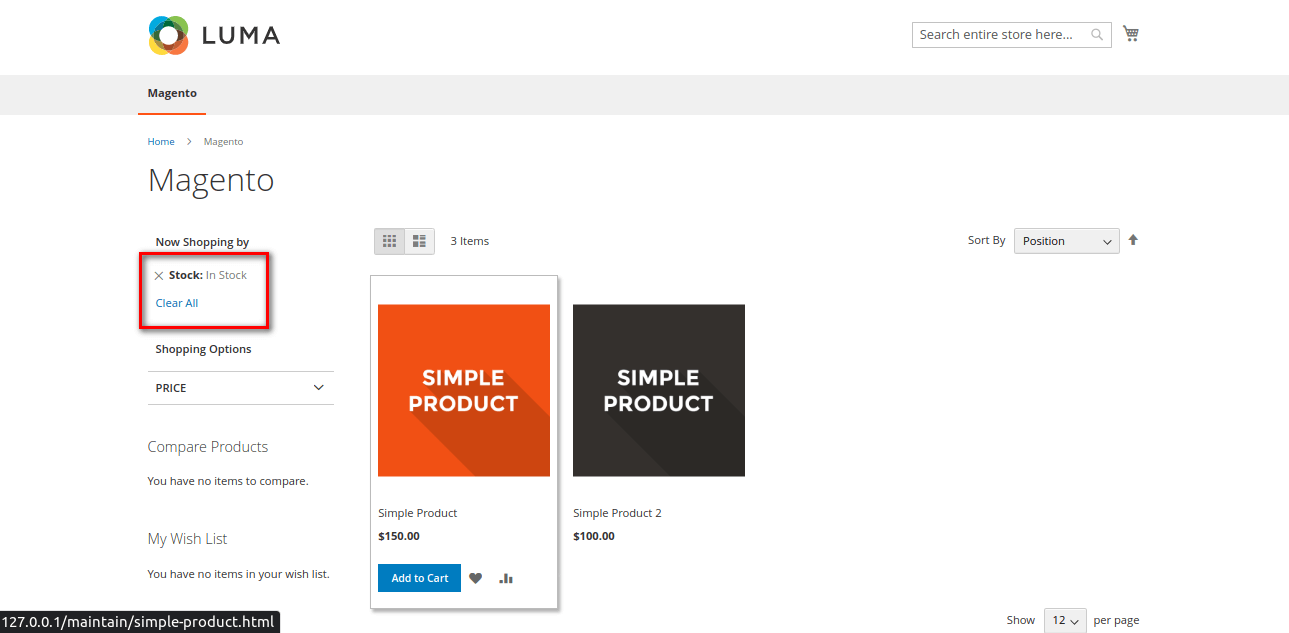
现在,如果客户在“库存”筛选器菜单中选择“有货”选项,它将显示可供购买的产品。
在库存过滤器中选择的库存期权
如果客户选择“缺货”选项,它将显示当前没有库存的产品。
在库存筛选器中选择缺货选项
结论:
通过执行以下步骤,您可以通过向类别分层导航添加库存筛选器来增强Magento 2商店的用户体验。这将使客户能够根据产品的可用性筛选产品,帮助他们查找当前有货或缺货的产品。