系统学习magento二次开发,推荐小册:《Magento中文全栈二次开发 》

本小册面向Magento2以上版本,书代码及示例兼容magento2.0-2.4版本。涵盖了magento前端开发,后端开发,magento2主题,magento2重写,magento2 layout,magento2控制器,magento2 block等相关内容,带领您成为magento开发技术专家。
在本Magento 2教程指南中,我将解释如何在Magento 2中从前端下订单后以编程方式向订单添加评论。
在Magento 2中,从前端下订单后以编程方式向订单添加评论或评论的能力对于各种目的非常有用,例如提供其他说明,说明或内部通信。
让我们看看如何在Magento 2中从前端下订单后以编程方式向订单添加评论。
在Magento 2中从前端下订单后,以编程方式向订单添加评论的步骤:
第 1 步:在 app\code\Vendor\Extension\etc\events.xml 创建一个文件,并添加以下代码。
<?xml version="1.0"?>

<config xmlns:xsi="http://www.w3.org/2001/XMLSchema-instance" xsi:noNamespaceSchemaLocation="urn:magento:framework:Event/etc/events.xsd">
    <event name="checkout_onepage_controller_success_action">
        <observer name="order_observer" instance="\Vendor\Extension\Observer\OrderObserver"/>
    </event>
</config>
第 2 步:在 app\code\Vendor\Extension\Observer\OrderObserver.php 创建一个文件,并添加以下代码。
<?php

namespace Vendor\Extension\Observer;

use Magento\Framework\Event\Observer;
use Magento\Framework\Event\ObserverInterface;
use Magento\Sales\Api\OrderRepositoryInterface;
use Magento\Sales\Model\Order\Status\HistoryFactory;

class OrderObserver implements ObserverInterface
{
     protected $orderRepository;

     protected $orderStatusHistoryFactory;

    public function __construct(
        OrderRepositoryInterface $orderRepository,
        HistoryFactory $orderStatusHistoryFactory
    )
    {
        $this->orderRepository = $orderRepository;
        $this->orderStatusHistoryFactory = $orderStatusHistoryFactory;
    }

    public function execute(Observer $observer)
    {
       $order = $observer->getEvent()->getOrder();
        $comment = "Your comment goes here.";
        $this->addCommentToOrder($order->getId(), $comment);
        return $this;
    }

    public function addCommentToOrder($orderId, $comment)
    {
        try {
        $order = $this->orderRepository->get($orderId);
        $statusHistory = $this->orderStatusHistoryFactory->create();
        $statusHistory->setComment(
                       __('Comment: %1.', $comment)
                   );
        $statusHistory->setEntityName(\Magento\Sales\Model\Order::ENTITY);
        $statusHistory->setStatus($order->getStatus());
        $statusHistory->setIsCustomerNotified(false)->setIsVisibleOnFront(false);
        $order->addStatusHistory($statusHistory);
        $this->orderRepository->save($order);
        } catch (\Exception $e) {
            throw new LocalizedException(__("Failed to add the comment to the order: %1", $e->getMessage()));
        }
    }
}
输出:
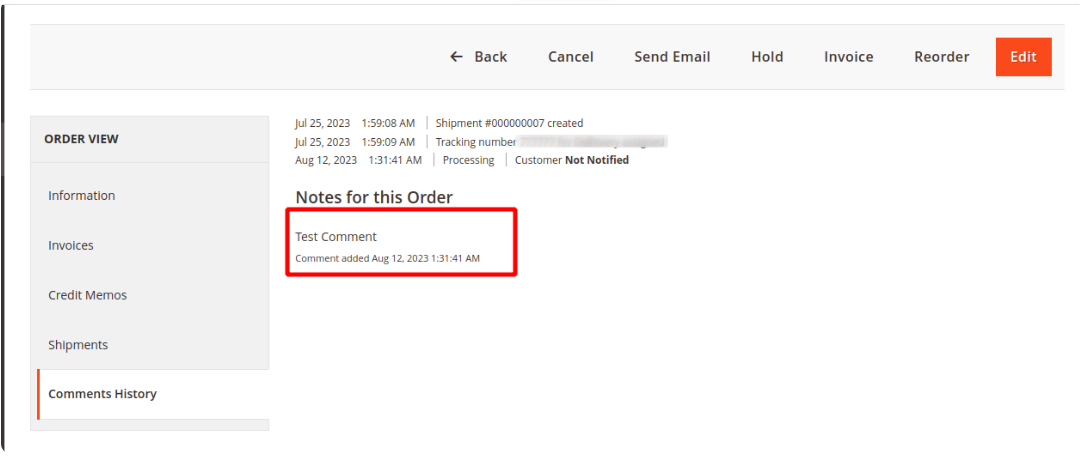
转到前端的订单视图页面,您现在应该在其中看到评论表单。添加评论,然后单击“提交评论”按钮。评论应添加到订单的状态历史记录中。
结论:
通过执行这些步骤,您可以通过启用向订单添加评论或评论来增强商店的沟通和组织。此功能对于跟踪与每个订单相关的特殊说明、更新或任何其他相关信息特别有用。您还可以使用Magento 2订单评论扩展来允许客户在结帐页面上添加评论并从后端成功管理它。